User Consent and Privacy
User consent is central to the KYC Passport functionality. This guide explains how user consent works, what users see, and important compliance considerations.
Overview
When users go through verification on a flow with partner sharing enabled, they must provide explicit consent before their data can be shared with partner organizations.
The Consent Process
When Consent is Requested
During the verification flow, users encounter a privacy consent step that clearly discloses:
- The main organization they're verifying with
- All partner organizations that will receive their data
- The types of data that will be shared
- Why the data is being shared (optional, based on your configuration)
What Users See
Users see a clear consent screen listing all organizations that will have access to their verification data:
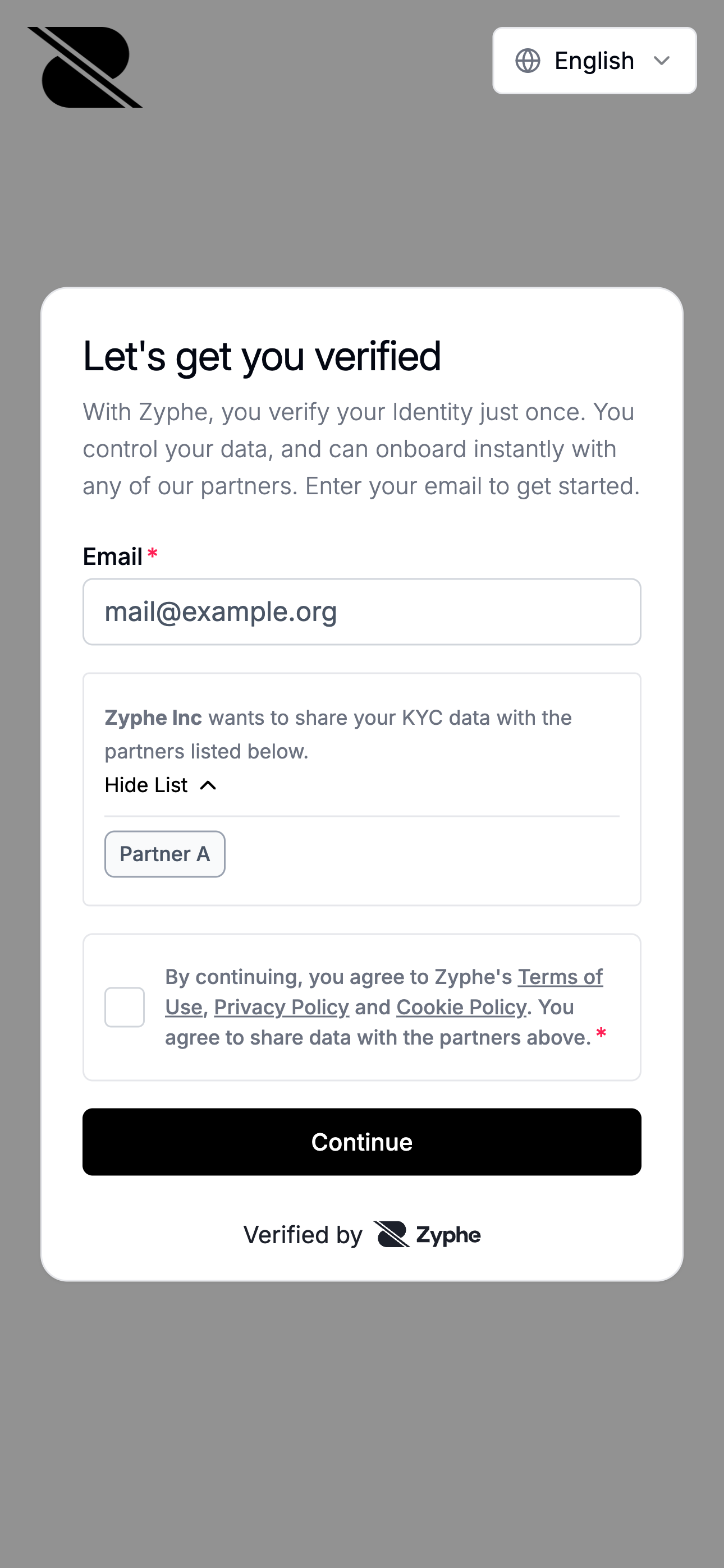
The consent screen includes:
- Organization names: Your organization and all invited partner organizations
- Data types: What information will be shared (identity documents, personal information, verification results)
- Consent checkbox: Users must explicitly check this to proceed
- Clear language: Easy-to-understand explanation of data sharing
User Decision
Users have two options:
-
Provide consent: Check the consent box and proceed with verification
- Their data will be shared with your organization and all accepted partner organizations
- Access grants are created for authorized partners
- Verification continues normally
-
Decline consent: Not check the consent box
- They cannot proceed with verification
- No data is shared with any organization
- No access grants are created
If a user declines consent, they cannot complete the verification process. Consider creating separate flows without partner sharing for users who prefer not to share their data.
Consent Rules and Timing
No Consent = No Access
If a user does not consent to data sharing:
- No access grants are created for any partner organizations
- Only metadata (non-PII) may be stored for analytics
- Partners cannot access any verification data
- The user must start over if they later decide to consent
Invite Timing Matters
The consent shown to users is based on the partners invited at the time of verification:
- Partners invited before user verification are included in the consent
- Partners invited after user verification do NOT receive access to that user's data
- This ensures users always know which organizations will receive their data
Example Timeline:
Day 1: Organization invites Partner A and Partner B
Day 2: User completes verification (sees A and B in consent)
Day 3: Organization invites Partner C
Result: Partners A and B can access the user's data
        Partner C CANNOT access this user's data
Consent is Flow-Specific
Each flow has its own partner list and consent:
- Users consent to share data for a specific flow
- They consent to share with the partners listed at that time
- Consent for one flow does not apply to other flows
- Users must consent separately for each flow they complete
Access Grant Creation
When a user consents and completes verification, the system creates cryptographic access grants:
Grant Creation Rules
-
Main Organization: Always receives an access grant when the user completes verification with consent
-
Accepted Partner Invites: If the partner has already accepted the invite before the user verified, they receive an access grant immediately
-
Pending Partner Invites: An access grant is created but remains inactive until the partner accepts the invite
-
Rejected Partner Invites: No access grant is created for partners who rejected invitations
-
No Consent: If the user doesn't consent, no partner grants are created (only the main organization receives a grant if verification proceeds through alternative means)
Grant Lifecycle
Need Help?
If you have questions about user consent and KYC Passport:
- Check the FAQ for common questions
- Contact our support team
- Consult with your legal/compliance team
- Review the KYC Passport technical documentation