Model Context Protocol (MCP)
Zyphe ships a built-in Model Context Protocol server that lets AI agents and MCP-compatible clients (Claude Desktop, Claude Code, Cursor, and any other MCP host) manage your flows, forms, and API keys programmatically through natural language.
Instead of writing REST clients or learning the dashboard UI, you can simply ask your AI assistant "create a new KYC flow with a document verification step and a form". The agent will call the right MCP tools on your behalf.
The MCP server is exposed by the same Zyphe API server that handles REST traffic. There is no separate process or port to run.
Capabilities at a glance
The MCP server exposes 19 tools organized into four groups:
- Flows: list, create, read, update, delete flows; manage flow-level settings (branding, webhooks).
- Flow steps: add, update, and delete steps inside a flow (DV, FORM, POA, KYB, SPID, PHONE, WALLET, LIVENESS, AUTO_ONE_CLICK_KYC, DOCUMENT_SELECTION, GEOLOCATION).
- Forms: list, create, read, update, delete forms with their sections.
- API keys: list, create, read, update, delete API keys (SECRET and PUBLISHABLE).
Every tool accepts an optional sandbox: boolean flag so you can target the sandbox environment from the same connection.
Authentication
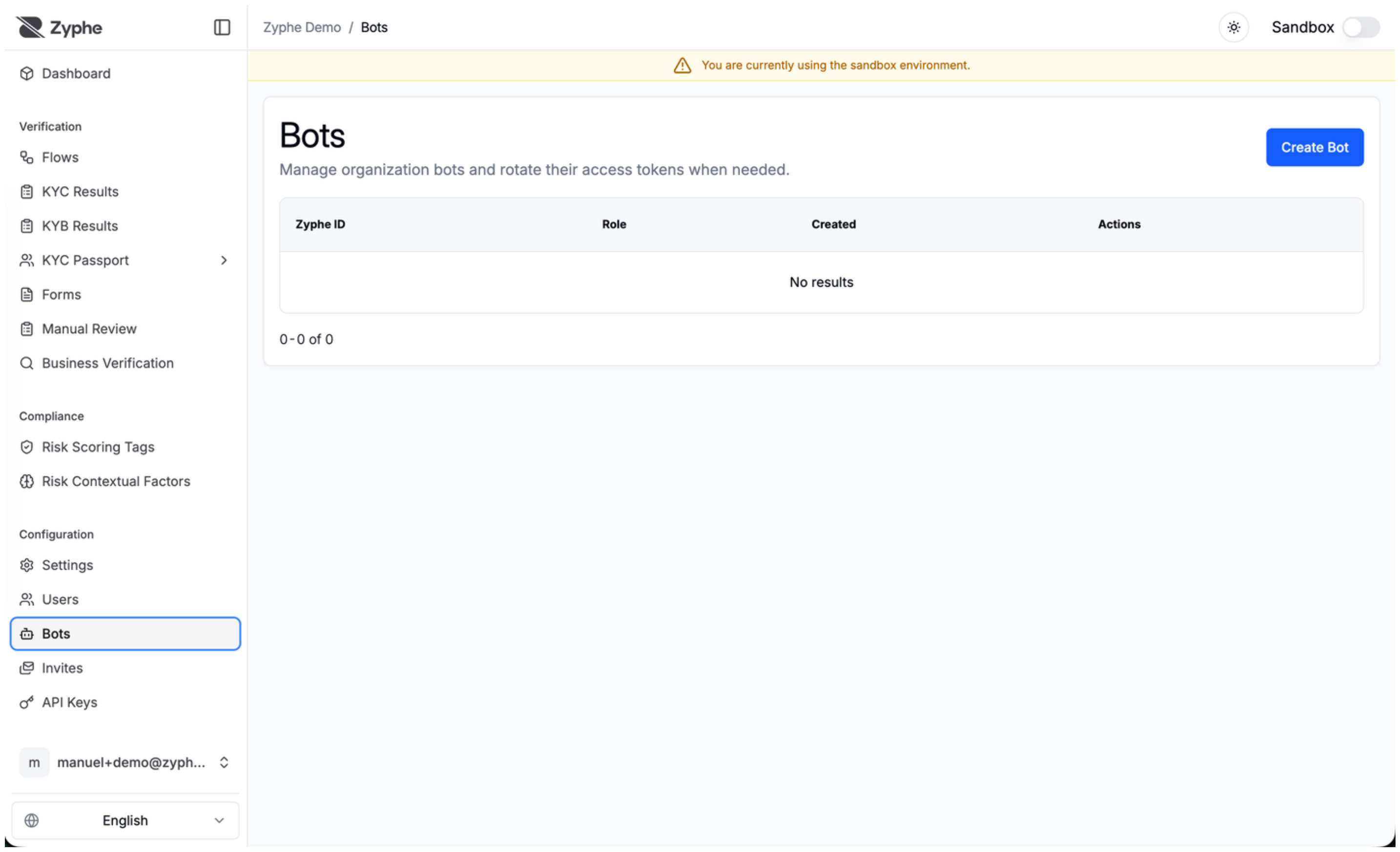
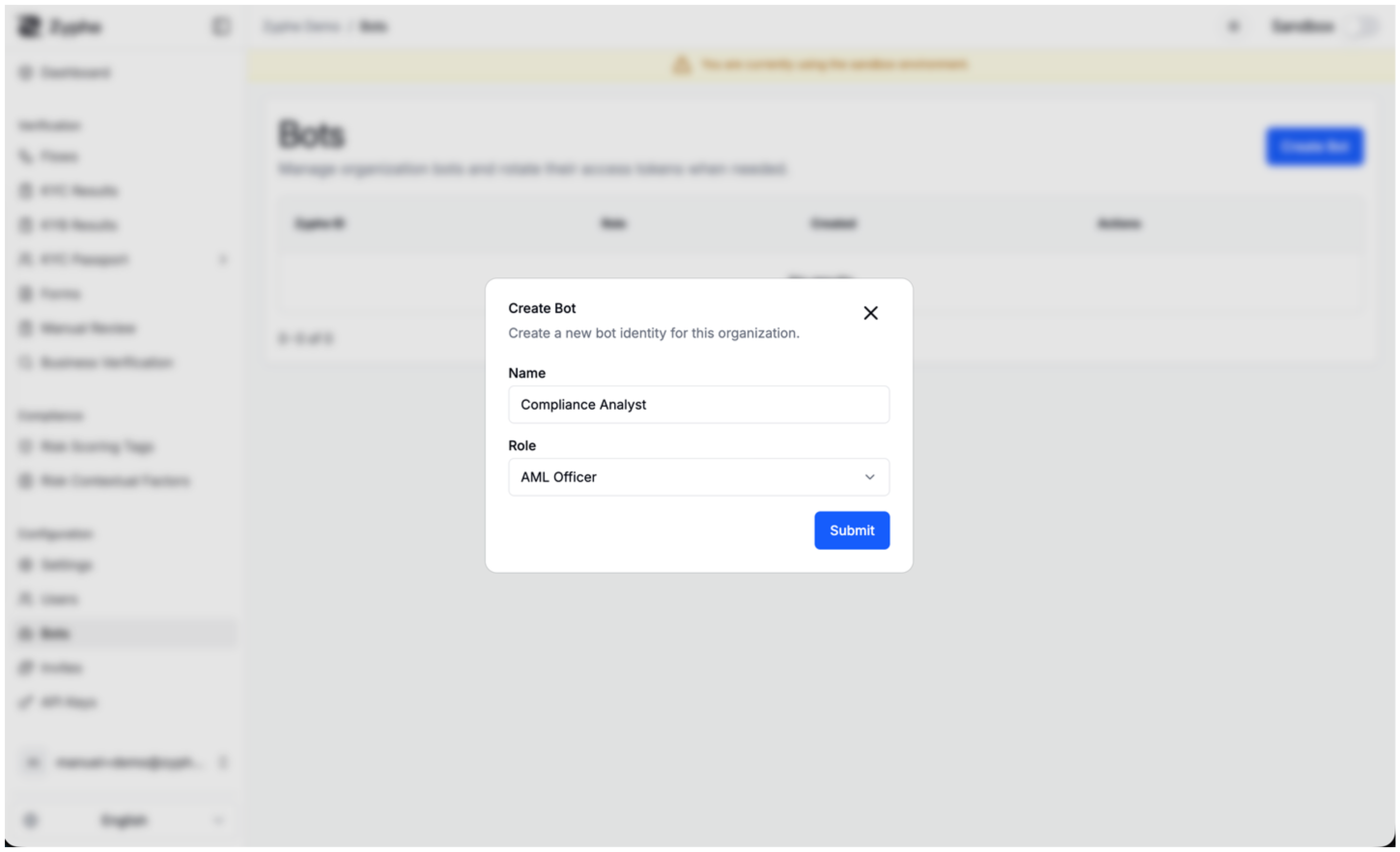
The MCP server is authenticated with bot tokens. Bots are organization-scoped service identities; their permissions are evaluated by the same role-based access control policies that govern the REST API, so a bot can only do what its assigned role is allowed to do.
1. Create a bot and obtain a token
Bot management lives under /organizations/{organization_id}/bots/... in the REST API:
| Method | Path | Purpose |
|---|---|---|
GET | /organizations/{org_id}/bots/list | List bots in the organization |
POST | /organizations/{org_id}/bots/create | Create a new bot (returns plain token) |
GET | /organizations/{org_id}/bots/{bot_id}/get | Fetch bot metadata |
POST | /organizations/{org_id}/bots/{bot_id}/regenerate-token | Issue a new token; the previous one dies |
DELETE | /organizations/{org_id}/bots/{bot_id}/delete | Soft-delete the bot |
The plain-text token is returned only once at creation (or regeneration). It looks like:
zyphe_bot_<48 random alphanumeric characters>
Tokens are SHA-256 hashed on the server, so Zyphe cannot retrieve a lost token. If you misplace one, regenerate it. Treat bot tokens like passwords: never commit them to source control, never paste them into chat logs.
2. Use the token
Send it as a Bearer token on the Authorization header:
Authorization: Bearer zyphe_bot_xxxxxxxxxxxxxxxxxxxxxxxxxxxxxxxxxxxxxxxxxxxxxxxx
If the header is missing or the token is invalid, the server responds with 401 Unauthorized. If the bot's role does not allow the requested operation, the tool call returns an MCP error with code INVALID_REQUEST and message "Permission denied".
Endpoint
The MCP server is mounted on the same host and port as the Zyphe API:
POST {ZYPHE_API_BASE_URL}/mcp
It uses the Streamable HTTP transport from the MCP specification. Any MCP-compliant client that supports HTTP transport can connect to it.
Connecting a client
Claude Desktop / Claude Code
Add an entry to your mcp.json (or the equivalent config UI):
{
  "mcpServers": {
    "zyphe": {
      "transport": {
        "type": "http",
        "url": "https://api.zyphe.com/mcp",
        "headers": {
          "Authorization": "Bearer zyphe_bot_YOUR_TOKEN_HERE"
        }
      }
    }
  }
}
Replace https://api.zyphe.com with the URL of your Zyphe deployment, and substitute your bot token.
Cursor
Cursor supports MCP via the same JSON config format. Add the snippet above to your Cursor MCP settings.
Generic / programmatic
Any MCP client SDK (TypeScript, Python, etc.) that supports the streamable-HTTP transport can talk to /mcp. Point the transport at the URL and inject the Authorization header.
Tool reference
All parameters use camelCase keys. Every tool also accepts an optional sandbox boolean (default false) to target the sandbox environment instead of production.
Flows
list_flows
List flows for the bot's organization, with optional pagination, sorting, and filtering.
| Field | Type | Required | Description |
|---|---|---|---|
skip | integer | no | Records to skip (default 0) |
take | integer | no | Records to return (default 100) |
sort | string | no | Sort field and direction, e.g. "createdAt:desc" |
filter | string | no | Semicolon-separated triples "field:operator:value" (e.g. "flow_type:eq:KYC") |
sandbox | boolean | no | Use sandbox environment |
create_flow
Create a new flow. Required: name, slug, webhookUrl, successUrl.
| Field | Type | Description |
|---|---|---|
name | string | Display name of the flow |
slug | string | URL-safe identifier (e.g. "kyc-flow") |
webhookUrl | string | Webhook URL called on flow completion |
successUrl | string | Redirect URL on successful completion |
failureUrl | string | Redirect URL on failure (optional) |
sandbox | boolean | Create in sandbox environment |
update_flow
Update an existing flow's metadata. Required: flowId, name, slug, webhookUrl, successUrl.
get_flow
Get a flow by its ID. Required: flowId.
delete_flow
Soft-delete a flow by its ID. Required: flowId.
get_flow_settings
Get the settings (branding, webhook options) for a flow. Required: flowId.
update_flow_settings
Update the settings for a flow. Required: flowId. All other fields are optional and patch-style; only provided fields are changed.
| Field | Type | Description |
|---|---|---|
primaryColor | string | Primary brand color (hex) |
secondaryColor | string | Secondary brand color (hex) |
profileImage | string | URL of the organization logo |
webhookSecret | string | HMAC secret for webhook signature verification |
extendedWebhook | boolean | Include extended data in webhook payloads |
published | boolean | Whether the flow is publicly accessible |
skipSignedAccess | boolean | Skip signed-URL access control |
Flow steps
create_flow_step
Add a new step to a flow. Required: flowId, name, stepType, config, order.
| Field | Type | Description |
|---|---|---|
flowId | string | UUID of the parent flow |
name | string | Display name of the step |
stepType | string | One of: DV, FORM, POA, KYB, SPID, PHONE, WALLET, LIVENESS, AUTO_ONE_CLICK_KYC, DOCUMENT_SELECTION, GEOLOCATION |
config | object | Step configuration object (must contain a matching stepType discriminator) |
order | integer | Position of the step in the flow (0-based) |
successUrl | string | Override success redirect URL for this step (optional) |
failureUrl | string | Override failure redirect URL for this step (optional) |
Each step type has its own config schema. See the flow-step guides for the shape of each step's configuration.
update_flow_step
Update a step's name, config, or redirect URLs. Required: flowId, stepId, config.
delete_flow_step
Soft-delete a step from a flow. Required: flowId, stepId.
Forms
list_forms
List forms for the bot's organization, with optional pagination and sorting. Same pagination fields as list_flows (without filter).
create_form
Create a new form. Required: name, sections.
| Field | Type | Description |
|---|---|---|
name | string | Display name of the form |
sections | array | Array of FormSection objects |
update_form
Update a form's name and/or sections. Required: formId.
get_form
Get a form by its ID. Required: formId.
delete_form
Hard-delete a form by its ID. Required: formId.
API keys
list_api_keys
List API keys for the bot's organization.
create_api_key
Create a new API key. Required: keyType. The plain-text key is returned once in the key field of the response, so store it immediately.
| Field | Type | Description |
|---|---|---|
keyType | string | SECRET or PUBLISHABLE |
name | string | Human-readable name (optional) |
description | string | Description (optional) |
allowedOrigins | array of strings | Allowed CORS origins (optional) |
options | object | Additional options as a JSON object |
get_api_key
Get an API key by its ID. Required: apiKeyId.
update_api_key
Update an API key's name, description, allowed origins, or options. Required: apiKeyId.
delete_api_key
Soft-delete an API key by its ID. Required: apiKeyId.
Sandbox vs production
Every tool takes an optional sandbox boolean. When true, the tool reads and writes against the sandbox dataset; when false or omitted, it operates on production data.
This means a single bot token can drive both environments, which is useful for agents that build a flow in sandbox, validate it, and then promote it to production in one session.
Error handling
MCP errors follow the standard MCP error model:
| Condition | Error code | Notes |
|---|---|---|
| Missing or malformed parameters | INVALID_PARAMS | Returned when JSON parsing or schema check fails |
| Unknown tool name | METHOD_NOT_FOUND | Tool not registered on this server |
| RBAC policy denial | INVALID_REQUEST | Message: "Permission denied" |
| Unexpected backend / DB / RBAC error | INTERNAL_ERROR | Server-side failure; check Zyphe logs |
HTTP-level failures (401, 403) are returned before the MCP envelope and indicate problems with the bot token or middleware, not with a specific tool call.
Example session
A typical agent conversation with the Zyphe MCP server might look like this (paraphrased; the agent translates intent into tool calls):
You: Create a sandbox flow called "Onboarding Test" with a document verification step.
Agent:
- calls
create_flowwith{ name: "Onboarding Test", slug: "onboarding-test", webhookUrl: "...", successUrl: "...", sandbox: true }- takes the returned
flowIdand callscreate_flow_stepwith{ flowId, name: "DV", stepType: "DV", config: { stepType: "DV", ... }, order: 0, sandbox: true }- returns: "Created sandbox flow
onboarding-test(id…) with one DV step at position 0."
Security notes
- Bot tokens authenticate at the request level; the MCP transport does not add a separate session layer.
- All tool calls are subject to the same role-based access control policies that govern the REST API. A bot scoped to a specific role cannot escalate privileges through MCP.
- Token hashes are stored with SHA-256; plain-text tokens are never persisted.
- Regenerating a bot's token instantly invalidates the previous one. Use this if you suspect leakage.