Compliance policy
The compliance policy holds the rules every KYB decision in your organization follows: how screening matches are treated, which fallbacks you accept, who may approve at each risk rating, whether a second signature is needed, and how decisions are reviewed afterwards. The dashboard, the Node SDK, and the KYB agent all decide under the same policy.
The policy lives under Settings → Compliance policy and can be edited by users with the ORG_ADMIN or AML_OFFICER role.
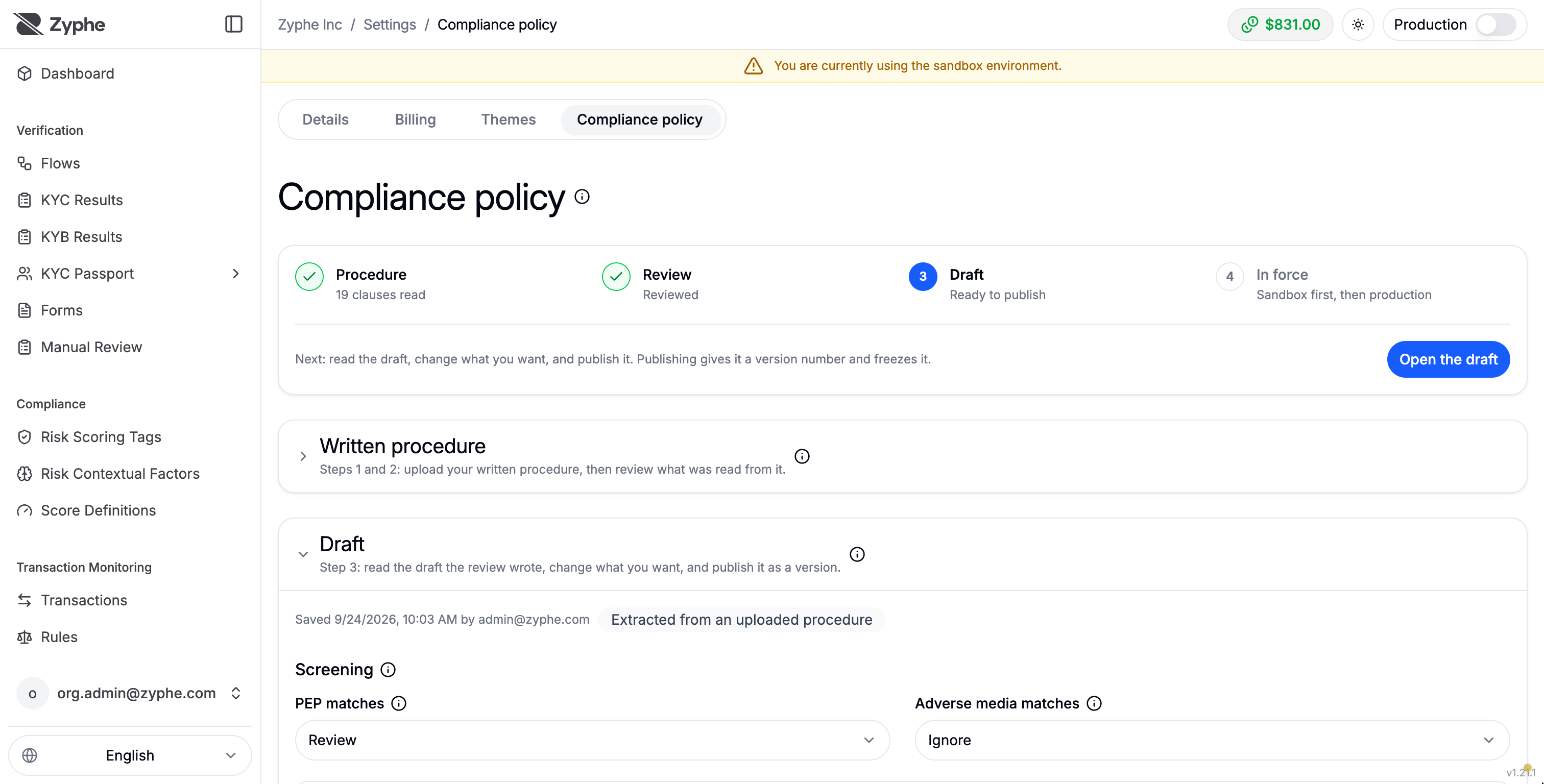
Versions
The policy is a series of numbered versions. You edit a draft; publishing it gives it a version number and freezes it. A published version is then put in force: first in the sandbox, then in production. Production only accepts a version that has been in force in the sandbox, so every rule change can be tried before it applies to real companies.
Every decision records the policy version it was taken under, and a case's coverage is read against the version in force.
Written procedure
You can start the draft from your own written procedure (your KYB SOP) instead of from scratch:
-
Upload the procedure as a PDF, plain text, or Markdown file, up to 20 MiB. Scanned PDFs are read with text recognition (up to 30 pages).
-
Review what was read. Each clause comes with the verbatim quote it was read from, and is classified as:
- Enforced: tied to a setting of the policy, for example a screening rule or an approval-matrix row;
- Guidance: kept as instructions for the reviewers and the KYB agent;
- Out of reach: something the platform cannot enforce.
For each clause, accept it, edit it, or drop it. A clause whose quote could not be found in the document raises an open question on that clause.
-
The accepted clauses become the draft. A draft that still has open questions cannot be published.
The uploaded file is not kept: only its fingerprint, the clauses, and their quotes are stored, and the quotes are shown only to ORG_ADMIN and AML_OFFICER users. Clauses reach the KYB agent and the case planner as data: they can make a case stricter, never relax a platform rule.
What the draft contains
Screening
For PEP matches and Adverse media matches, choose:
- Review (the default): a match holds the subject until a reviewer rules it a false positive. A confirmed match can still be approved, by the roles your approval matrix names for approvals "with a confirmed screening match".
- Reject: a match a reviewer rules a true positive leaves rejection as the only decision open; no exception can clear it. A false positive releases the subject exactly as under Review, and a match nobody has ruled on still holds.
- Ignore: matches are listed and marked as ignored, need no verdict, and never hold the case.
Sanctions matches are always reviewed. For PEPs, keep in mind that some regulators (for example in the UK) tell firms not to decline a customer merely for being a PEP; Review is the setting that fits that guidance.
Admitted fallbacks
A fallback is a weaker way of covering a requirement, for example screening an owner by name only because no email was collected, so they could not complete KYC. A fallback your policy admits counts as covered; any other fallback blocks approval until a reviewer records an exception for it.
Organizations that existed before the compliance policy started with name-only screening admitted. New organizations admit no fallback until they choose to.
Approval matrix
The approval matrix says, for each rating (Low, Medium, High, Critical) and each kind of approval, who may decide and whether a second signature is required. The kinds of approval are:
- Clean: nothing is excepted and no confirmed match stands;
- Resting on an exception: the approval relies on a recorded exception;
- With a confirmed screening match: a true positive stands in a category your policy reviews.
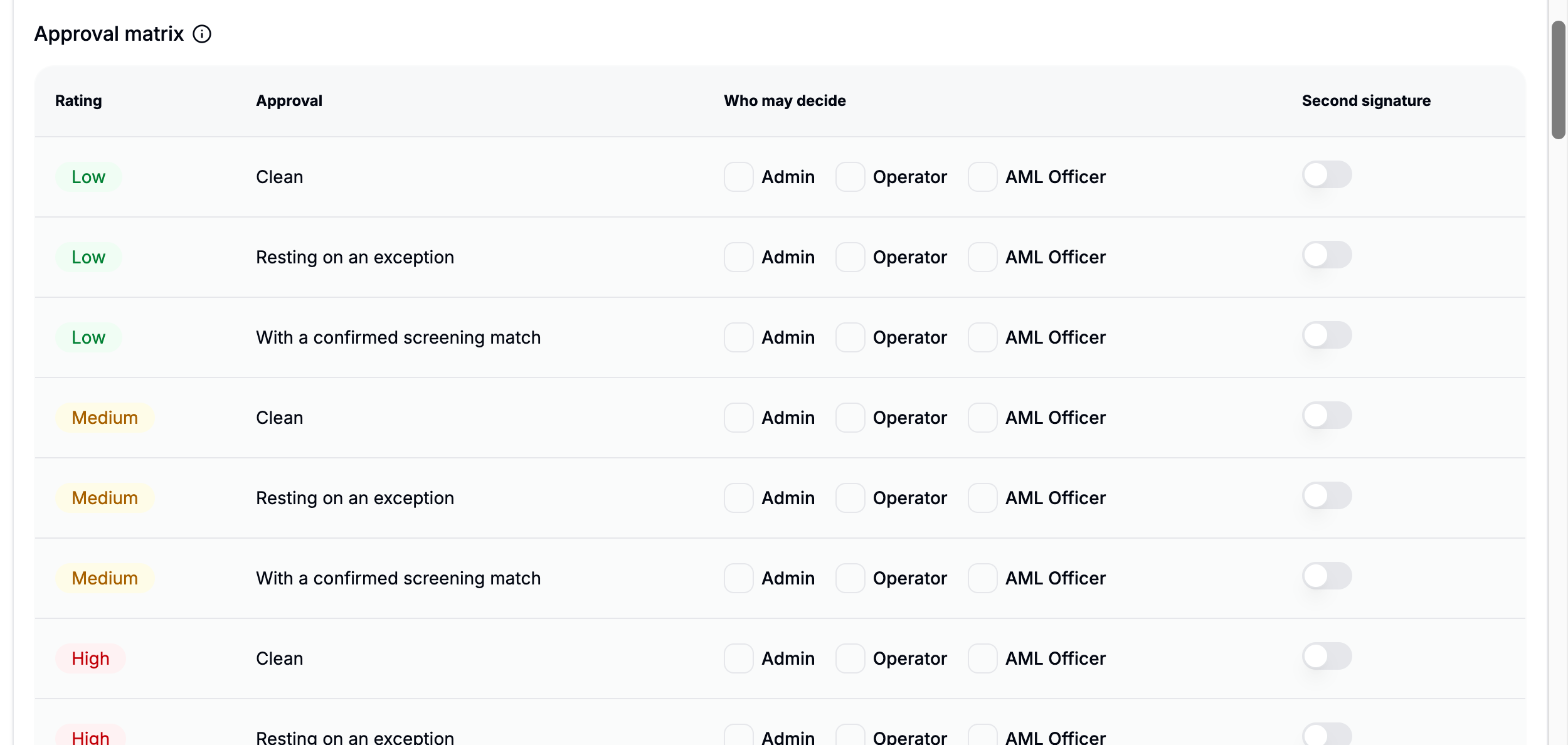
- A row with no role selected lets any role that works cases decide.
- With no rows at all, anyone who may work cases decides alone.
- A company without a rating uses the strictest row. A rejection uses the Clean row of the company's rating.
- With Second signature on, the first decision becomes a proposal that a different person confirms. See Two signatures.
- Decisions taken with an API key act with the
ORG_ADMINrole: they are refused where the row does not name Admin, and they can be the first signature, never the second.
The policy also says whether a rating can be lowered by hand. Raising it is always allowed.
Quality-review sampling
The share of decisions drawn for a quality review. A drawn decision is reviewed by someone who did not sign it; a disagreement reopens the case.
Approval validity
How long an approval stays valid before the company is reviewed again, and how many re-reviews can open per day.
KYB orchestration rules
KYB orchestration rules (on the same page) let your organization add checks to the cases that match a condition, for example requiring an extra document for a given country or legal form. A flow uses them when its Case planner is set to Organization's rules. Each rule's suggestions appear on the case as proposed changes for a reviewer to accept. Rules can be created, edited, enabled, and disabled at any time.
Related
- Reviewing KYB cases: exceptions, decisions, and quality reviews in practice.
- KYB Overview: the case statuses and flow setup.
- Manage Users: the roles and their permissions.