Reviewing KYB cases
Every KYB submission is a case. This page walks through how a reviewer works one in the Zyphe Dashboard: finding it, reading what was checked, clearing what blocks it, and deciding it. The rules a decision follows (who may decide, when a second signature is needed, how screening matches are treated) come from your compliance policy.
Cases can be worked by users with the ORG_ADMIN, ORG_OPERATOR, or AML_OFFICER role. See Manage Users for the full permission matrix.
Cases to work on
Open KYB Results in the sidebar. Cases to work on groups the open cases by what they need from you:
- Ready for review: every check has finished; the case is waiting for a decision.
- Action required: a person has to act, for example on a screening match or an escalation.
- Waiting for input: a request is open with the applicant.
- Processing: checks are still running.
Each row shows the company, its due-diligence level, the stage, who the case is waiting on, how many checks are done, the risk rating, and who it is assigned to. Turn on Only assigned to me to see your own cases.
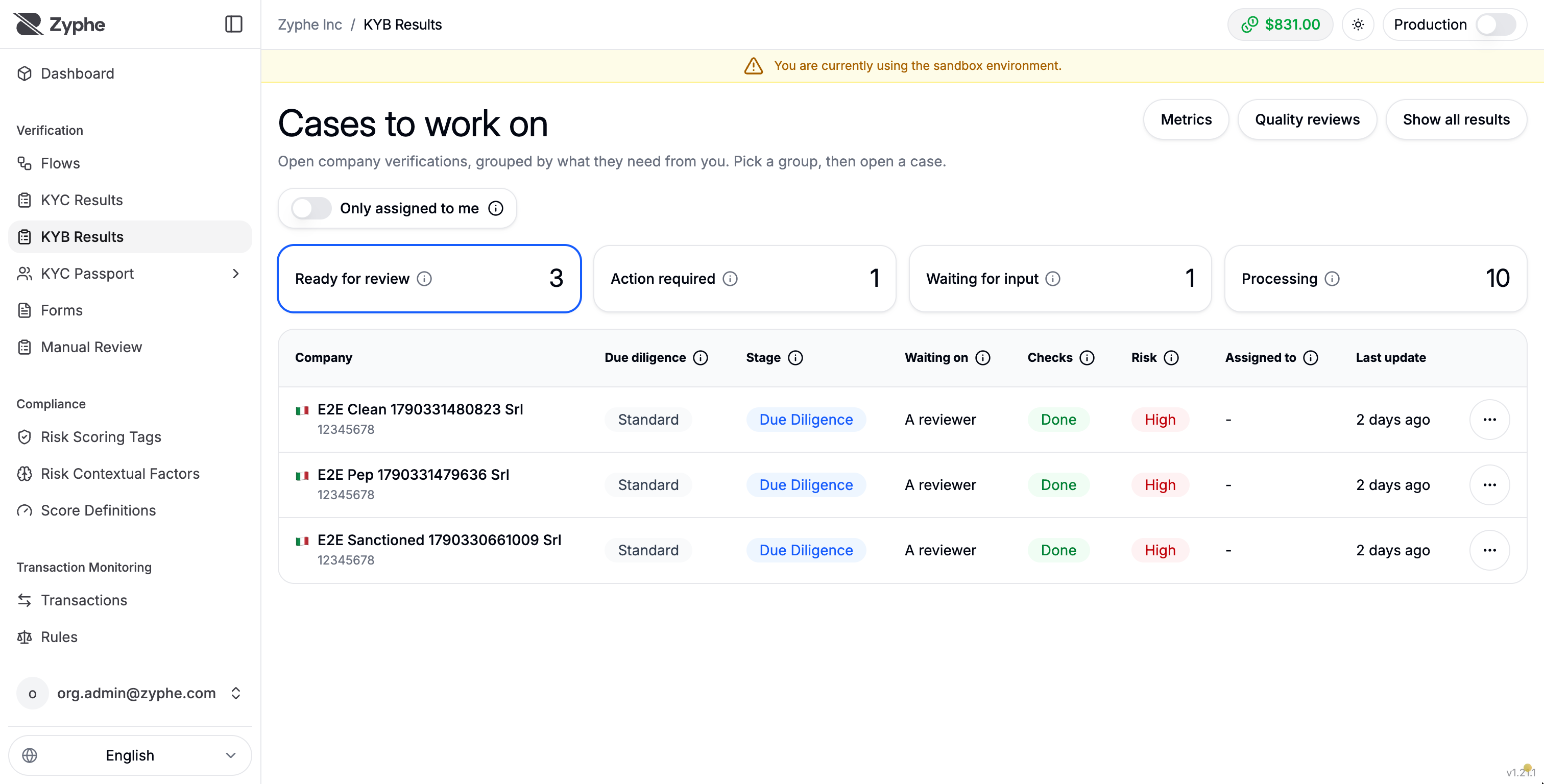
From a row's ⋯ menu you can:
- Assign the company to a reviewer. An assignment belongs to the company, so it applies to every case of that company.
- Override risk: set the rating by hand, with a reason and an expiry. Raising it is always allowed; lowering it is allowed only if your policy permits downward overrides and you have the authority for the level being left.
The buttons at the top open Metrics, Quality reviews, and Show all results (every case, including decided ones, with search and filters).
The case page
Open a case to see everything about it on one page. The header stays visible as you scroll.
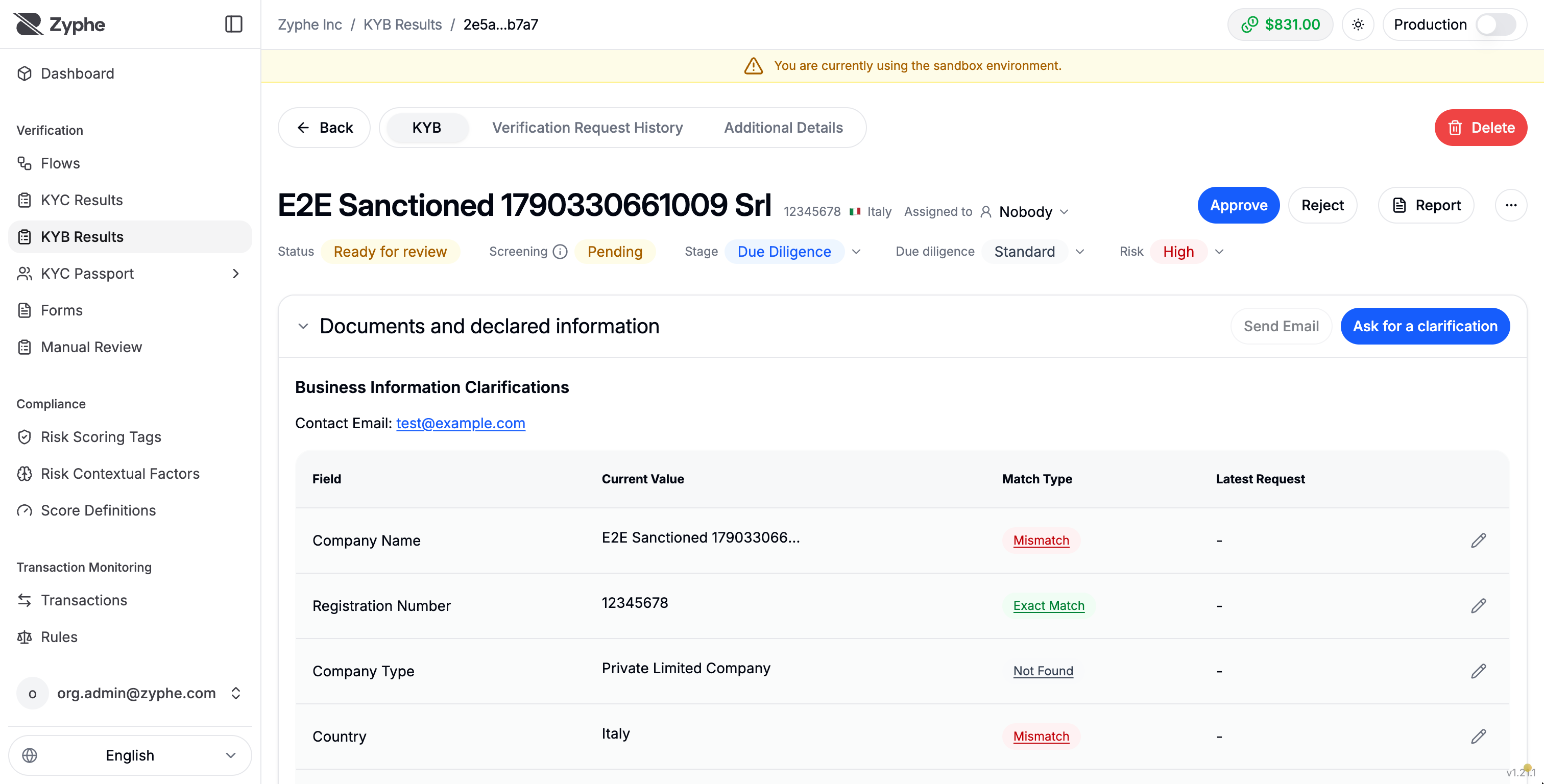
The header shows:
- Status: the case status.
- Screening: whether the company's and its people's screening is complete.
- Stage and Assigned to.
- Due diligence:
Simplified,Standard(the default), orEnhanced.Enhancedadds a financial-documents requirement; otherwise the checks are the same at every level. Changing it makes the case plan its checks again. - Risk:
Low,Medium,High, orCritical, the worst of the company's risk score, its screening, and each person's screening and KYC. A confirmed match keeps the rating high even after approval. How it is computed shows the breakdown. - Report: generate, upload, or download the case report.
- Approve and Reject when the case can be decided (see Deciding a case).
Documents and declared information
Business Information Clarifications compares each field the applicant declared with what the documents and the official register say, graded Exact Match, Partial Match, Mismatch, or Not Found. Select a field to see the agent's reasoning and every source.
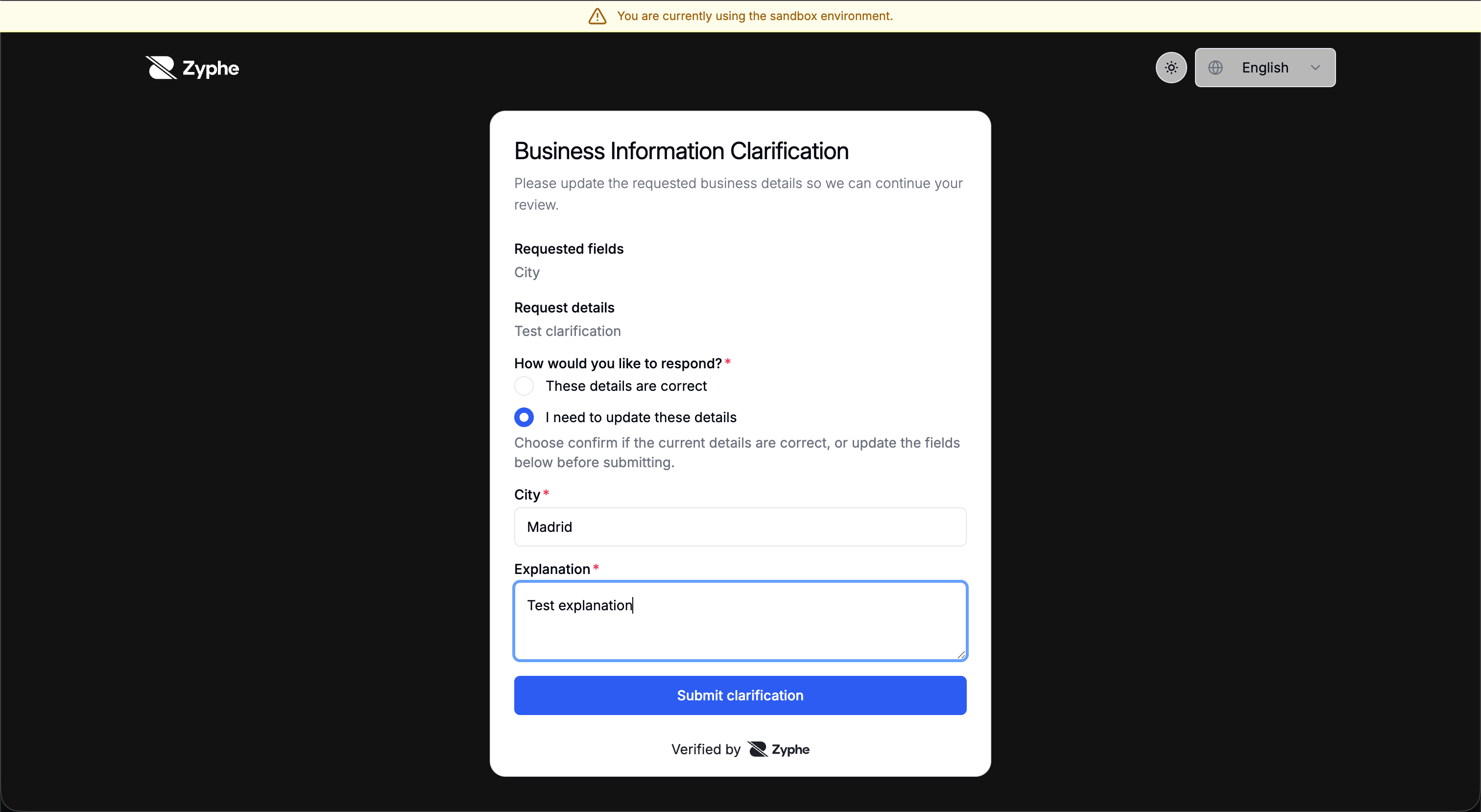
To resolve a discrepancy, use Ask for a clarification: the applicant is asked to confirm or correct the selected fields, and you review each answer (old value next to new value) before accepting it. Send Email requests a named document instead.
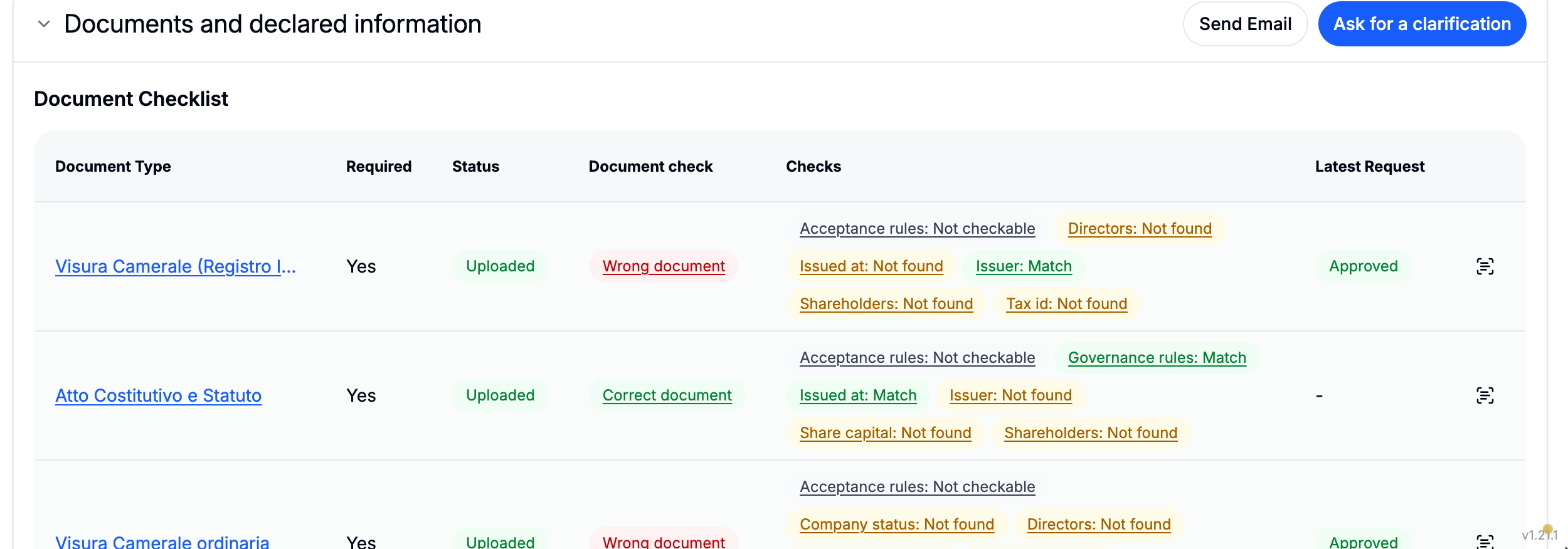
The Document Checklist lists every document the company's country requires. Each upload is classified and checked automatically:
- Document check: whether the file is the document it claims to be (for example, Correct document or Wrong document).
- Checks: each field read from it (issuer, issue date, shareholders, directors, and so on) marked Match, Mismatch, Not found, or Not checkable.
A reviewer can override any check; the override is recorded next to the automatic verdict.
Register documents lists the official documents the company's register holds. Listing them is free; buying one spends credits. This is not available in the sandbox.
To ask for a document your flow marks as on demand, request it from the document list (or from your backend with the Node SDK).
Case activity
Case activity is the workbench: what the case is waiting for and everything that happened to it.
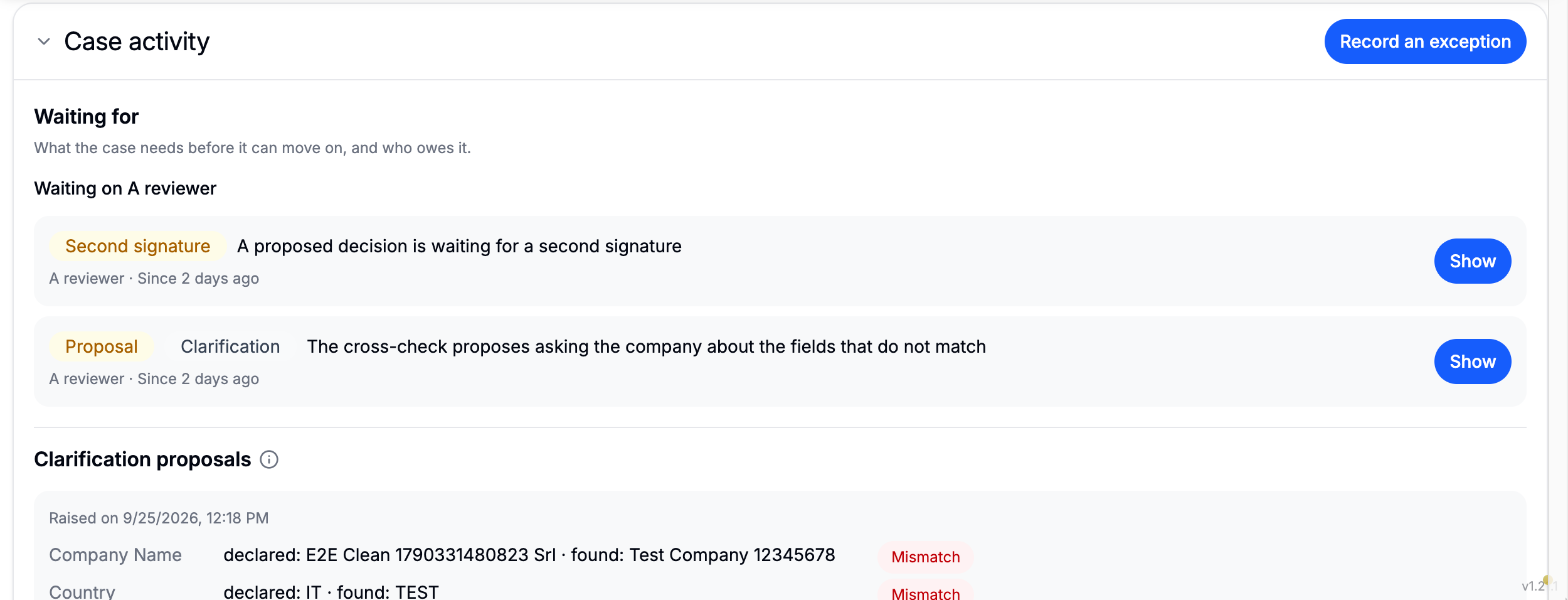
- Waiting for: every outstanding item, with who owes it and since when: a blocker, an open screening match, an exception needed before approval, a proposal to answer, a second signature awaited, a quality review due. Show jumps to where you act on it.
- Clarification proposals: when the cross-check finds fields that do not match, it proposes asking the company about them. Accept opens the clarification request; Decline drops it.
- Steps and runs: each check of the case and its latest run. A failed check can be confirmed by a reviewer with a reason and evidence (for the register, ownership, director, and cross-checks; not for screening or KYC), or run again.
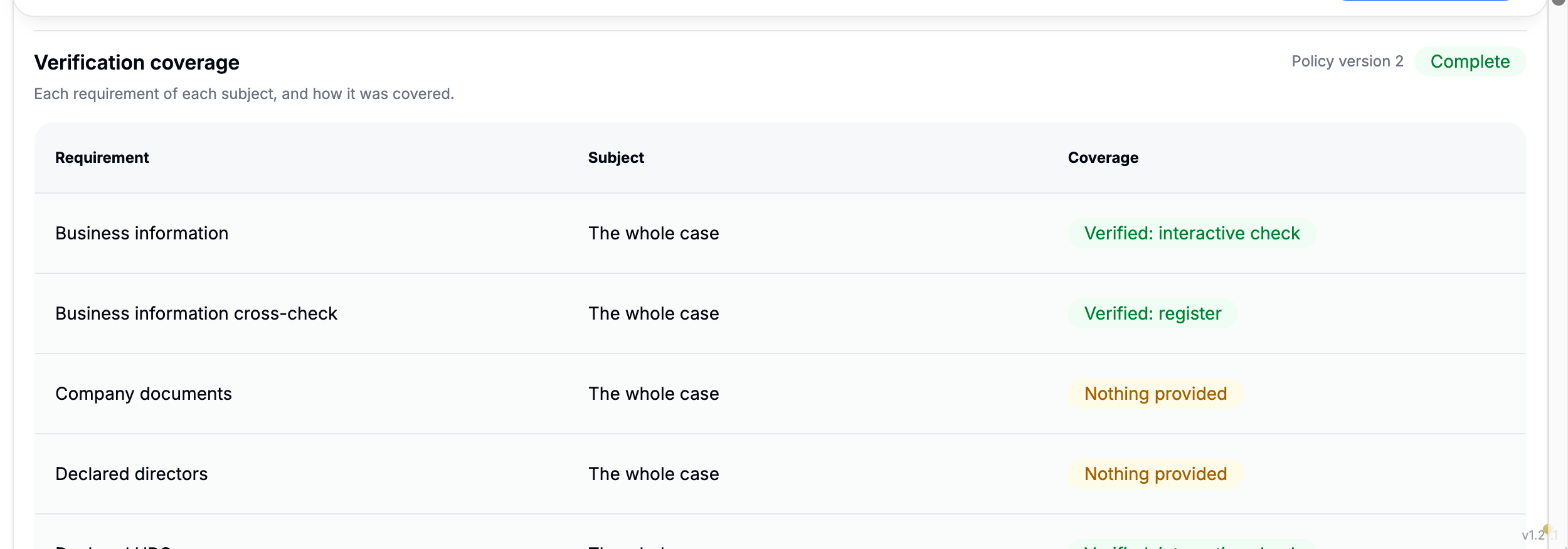
- Verification coverage: each requirement of each subject, and how it was covered (for example, verified by the register or by an interactive check, screened by name, or Nothing provided when the flow did not collect that part). Coverage shows what was actually checked, which a rating cannot: an unscreened company can still rate Low.
- Exceptions, Decisions, and Agent reviews: the history of each, with who acted and why.
- The case's account: a timeline of the case, its episodes, and each person's progress.
Proposed changes
When the flow's case planner is AI proposals or Organization's rules, Proposed changes lists the changes suggested for this case, such as requiring a step, raising the due-diligence level, widening screening, or asking the owners or directors to complete KYC. The planner can only propose changes that make the case stricter. A reviewer accepts or refuses each one; a refused change is not proposed again. In Auto-pilot, changes apply on their own, except ones that need a choice (such as which KYC flow to use).
Company screening
The screening card lists every match found for the company and its people, by category (sanctions, PEP, adverse media, other), with the match score and the details the list holds.
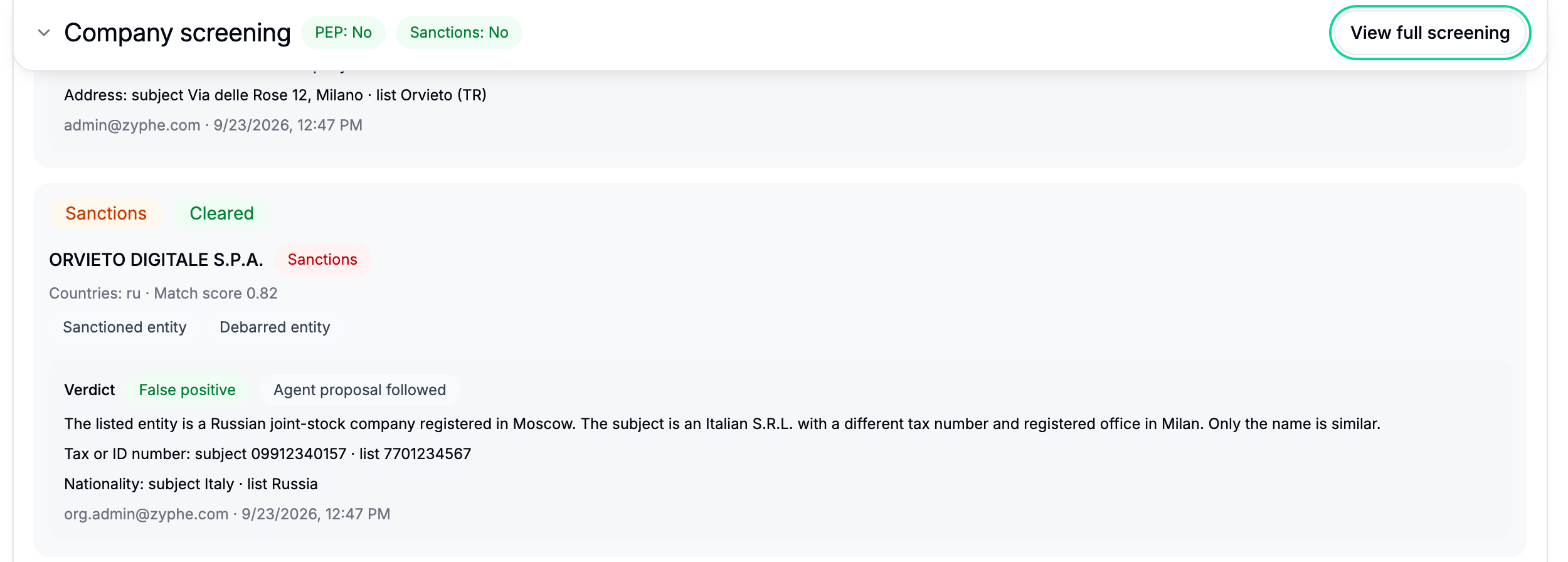
Each match gets a verdict:
- False positive: the match is not the subject. It needs at least one discriminator: date of birth, nationality, tax or ID number, address, gender, or another reason with a note. Only a false positive releases the match.
- True positive: the match is the subject.
- Undetermined or Customer contacted: the match holds while you find out more.
The AML agent can propose a verdict with its discriminators; you can follow it or record your own. A verdict is not edited afterwards, and it carries over to the same match when the company is screened again.
Where your policy rejects a category (for example PEP or adverse media), a true positive in it blocks approval outright: no exception can clear it. Sanctions matches are always reviewed, whatever the policy says.
People
People lists the owners and directors of the company with their roles, KYC status, and screening.
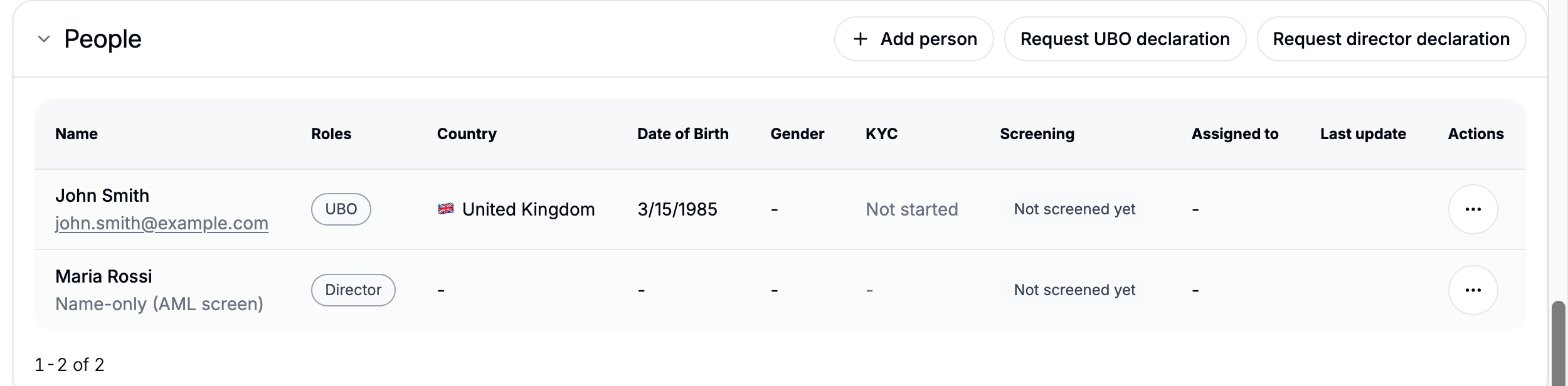
- Add person adds an owner or director to the case; removing someone's role cannot be undone.
- Request UBO declaration and Request director declaration ask the applicant to declare that part again (available when ownership discovery is enabled).
- From a person's menu, Send reminder re-sends the KYC invitation, and Open KYC result opens their KYC.
A person without an email is screened by name only (Name-only (AML screen)) and cannot be invited to KYC.
Ownership structure
When ownership discovery ran, Ownership structure draws who owns the company, with unresolved branches marked. You can extend individual branches, or add the structure by hand when discovery is off. State or public ownership records whether the owners include a state or public body.
Audit trace
Audit trace records every event on the case (submissions, checks, requests, verdicts, exceptions, decisions, agent reviews) with the actor, the action, and the details.
Deciding a case
Approve is available when the case is Ready for review; Reject also from Action required. Every decision is final: it is never rewritten, and remediation happens by reopening the case.
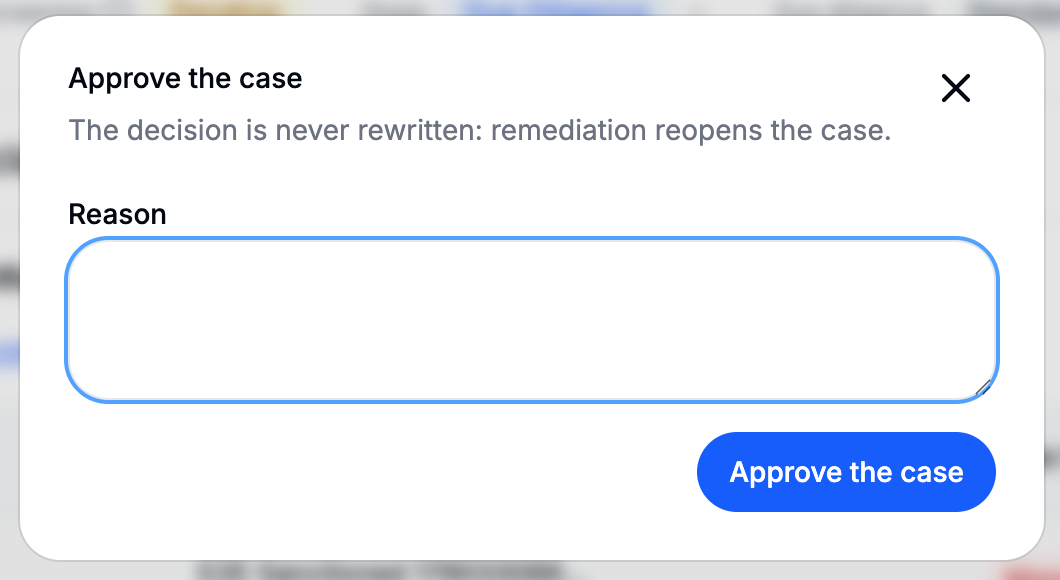
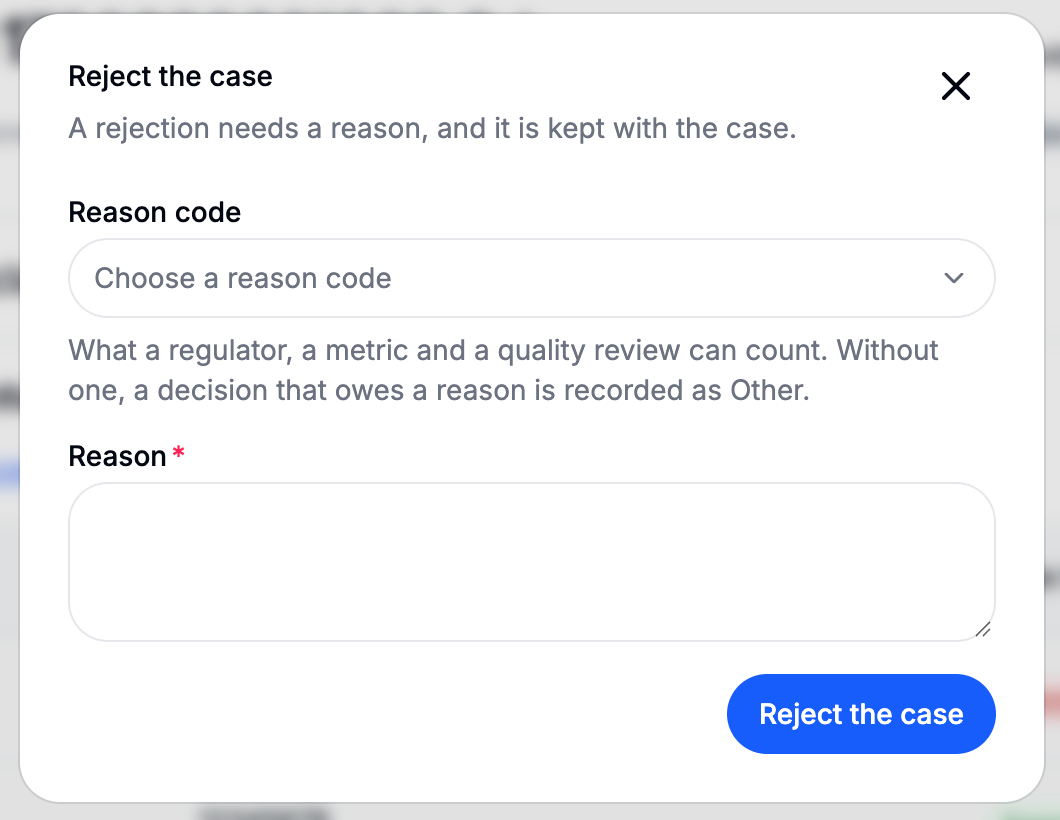
- A reason is required on every rejection, and on an approval that rests on an exception or on a confirmed match. It is optional on a clean approval.
- A reason code classifies the decision so regulators, metrics, and quality reviews can count it:
CDD_INCOMPLETE,SANCTIONS_CONFIRMED,PEP_CONFIRMED,ADVERSE_MEDIA,OUTSIDE_RISK_APPETITE,SUSPECTED_FRAUD,APPLICANT_UNRESPONSIVE, orOTHER. Without one, a decision that owes a reason is recorded asOTHER. - Your approval matrix decides who may approve at each rating, and whether a second signature is needed. See Approval matrix.
The decision sends one webhook (verification.kyb.completed or verification.kyb.failed), and a sealed decision package records the coverage, exceptions, signatures, and policy version behind it.
Exceptions
Some things block an approval until a reviewer takes responsibility for them, for example provider results still pending, open clarifications, or a fallback your policy does not accept (such as screening a person by name only). Record an exception covers exactly one of them, with a reason and an expiry date. Recording one needs the authority to approve that rating "with an exception" in your approval matrix, and it can be withdrawn.
An exception never clears a true positive in a category your policy rejects. Separately, a step can be waived (proposed, then approved), but sanctions and PEP screening and the platform's mandatory steps can never be waived.
Two signatures
When your approval matrix asks for a second signature, the first Approve or Reject records a proposed decision instead of closing the case. The case header then shows who proposed it, with Confirm and Withdraw proposal.
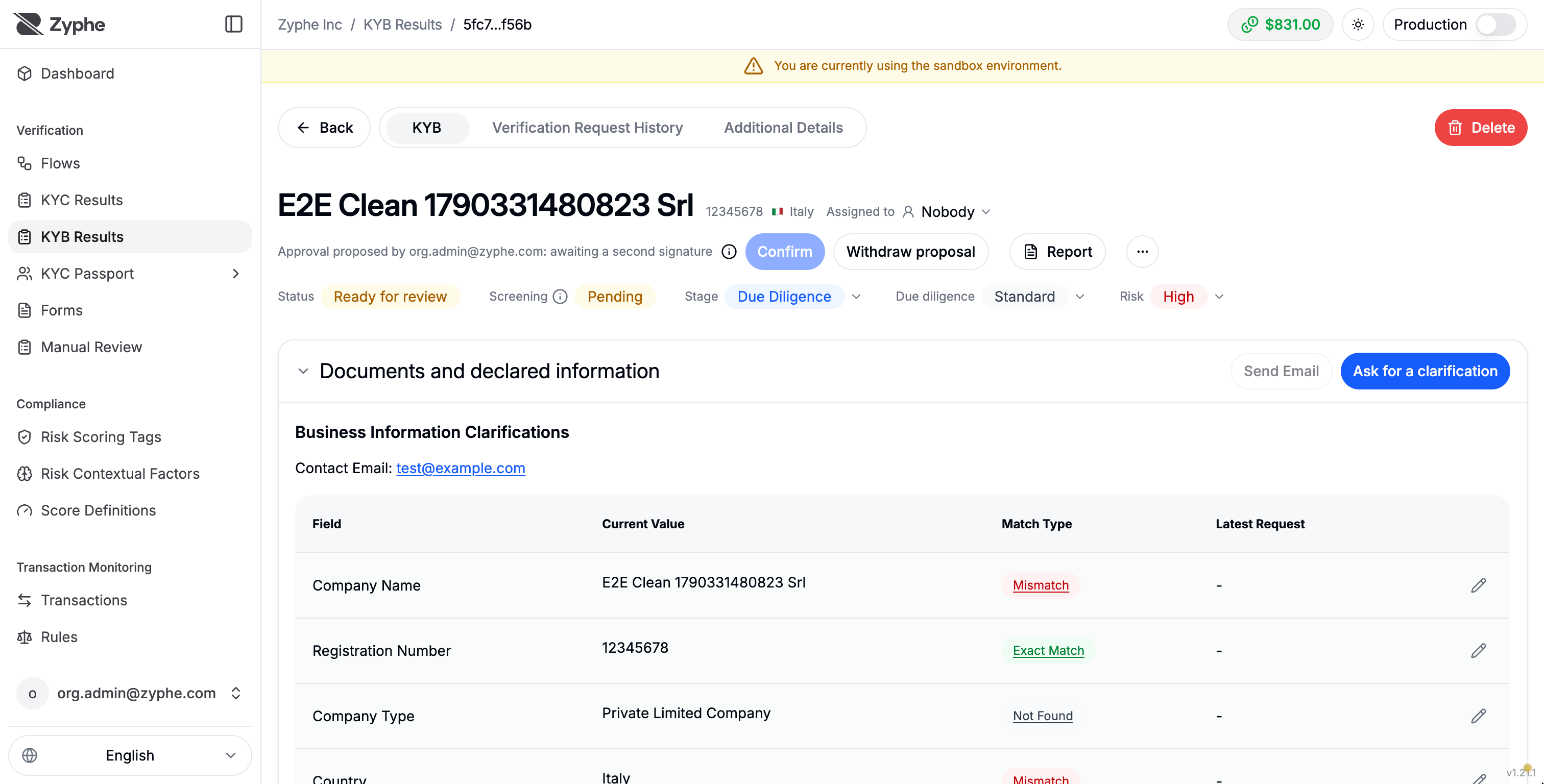
- The confirmation must come from a different person holding one of the awaited roles. The proposer cannot confirm their own proposal.
- An API key or the KYB agent can take the first signature, never the second.
- A proposal lapses if the case, its screening matches, or the policy in force change before it is confirmed.
After the decision
Quality reviews
Your policy can draw a share of decisions for a second look. Quality reviews lists the decisions waiting for one, oldest first. Nobody reviews a decision they signed.
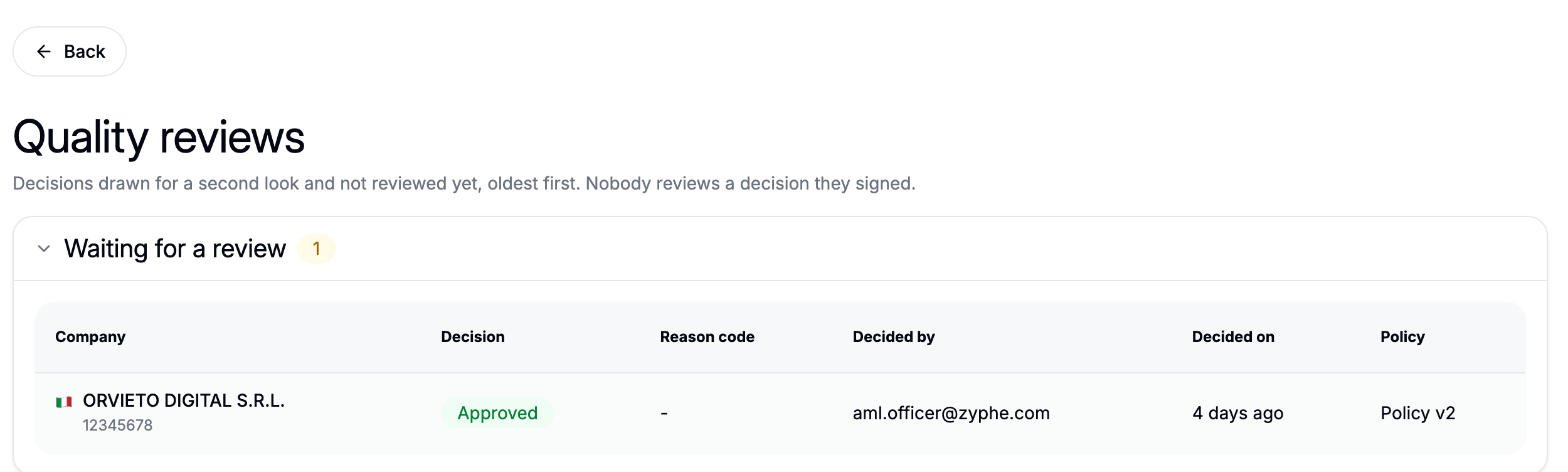
A reviewer agrees or disagrees, with a reason. A disagreement reopens the case, even an approved one, and sends a verification.kyb.review webhook.
Periodic re-review
Your policy sets how long an approval stays valid. When it expires, the case is reopened for a new review, and a verification.kyb.review webhook is sent.
Metrics
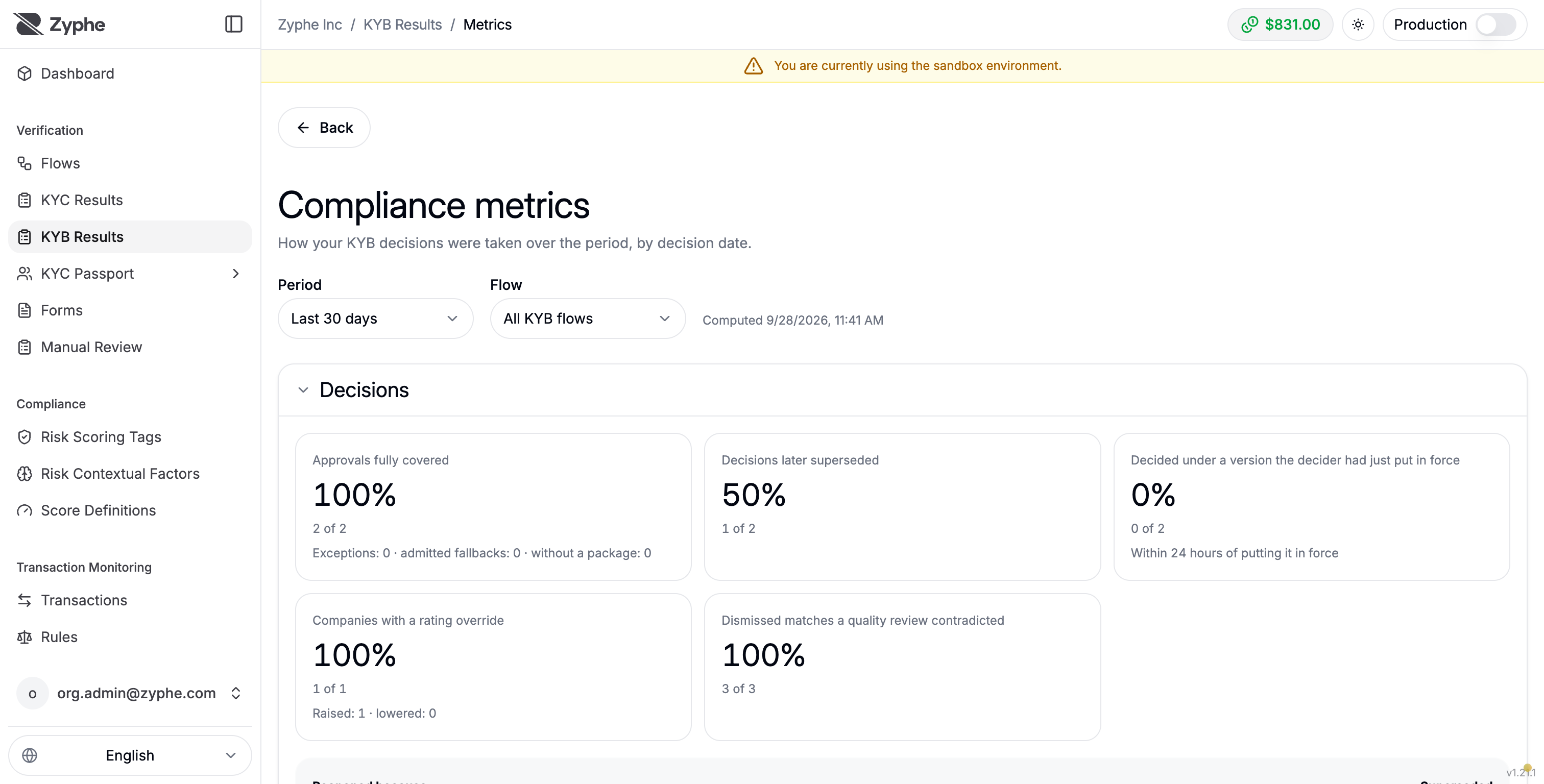
Metrics shows how your KYB decisions were taken over a period, by flow: how many approvals were fully covered, how many decisions were later superseded, rating overrides, time to decision by rating, the agent's reviews and agreement, quality-review outcomes, who decided, and how quickly applicants answered requests.
Related
- KYB Overview: flow setup and the case statuses.
- Compliance policy: the approval matrix, screening rules, exceptions, and review cycles.
- KYB Agentic Review Engine: how the KYB agent reviews a case.
- Node SDK: KYB cases: reading and deciding cases from your backend.