Model Context Protocol (MCP)
Zyphe ships a built-in Model Context Protocol server that lets AI agents and MCP-compatible clients (Claude Desktop, Claude Code, Cursor, and any other MCP host) both configure your organization — flows, forms, API keys — and operate on compliance cases — KYB files, AML screenings, KYC results, and the audit trail.
Instead of writing REST clients or learning the dashboard UI, you can ask your AI assistant "create a new KYC flow with a document verification step and a form", or "show me what happened to this KYB case and who did it". The agent calls the right MCP tools on your behalf.
The MCP server is exposed by the same Zyphe API server that handles REST traffic. There is no separate process or port to run.
Capabilities at a glance
The MCP server exposes 39 tools in eight groups. Fourteen of them work KYB cases, three dispose of AML screening hits, and two read a KYC case and the audit trail, so an agent can carry a review from open case to approval or escalation — and evidence what it did — not only configure the flows that produce them.
- KYB: read a KYB result, request and review business-information clarifications, correct field values, add or remove UBOs and directors, request per-country documents, send UBO KYC invitations, set the screening strategy, approve, or escalate to admin review.
- AML: read a screening result, clear a false positive, or escalate to a human reviewer.
- KYC: read a verification case as a decision summary.
- Audit trail: read the organization's tamper-evident audit log.
- Flows: list, create, read, update, delete flows; manage flow-level settings (branding, webhooks).
- Flow steps: add, update, and delete steps inside a flow (DV, FORM, POA, KYB, KYB_DOCUMENTS, KYB_UBOS, KYB_DIRECTORS, SPID, PHONE, WALLET, LIVENESS, AUTO_ONE_CLICK_KYC, DOCUMENT_SELECTION, GEOLOCATION).
- Forms: list, create, read, update, delete forms with their sections.
- API keys: list, create, read, update, delete API keys (SECRET and PUBLISHABLE).
The KYB and AML write tools are guarded server-side. approve_kyb_result refuses while any clarification is open or any document-backed field is not a match, and clear_aml_result refuses on a high-confidence sanctions match, Critical overall risk, a result already under a human verdict, or a screening with no identity discriminators. The guard is deterministic and lives on the server, so it holds whatever the calling model decides.
Every tools/call is recorded as a readable audit row carrying the tool name, redacted arguments, the mapped action, and the target resource id. Protocol traffic (initialize, tools/list, ping) is not logged, and neither are the unauthenticated probes MCP clients make before completing authentication. See Auditing.
Every tool accepts an optional sandbox: boolean flag so you can target the sandbox environment from the same connection.
get_kyc_result and get_audit_trail let an agent read a KYC case and evidence its own work
against the audit log. See Reading cases and evidence.
Authentication
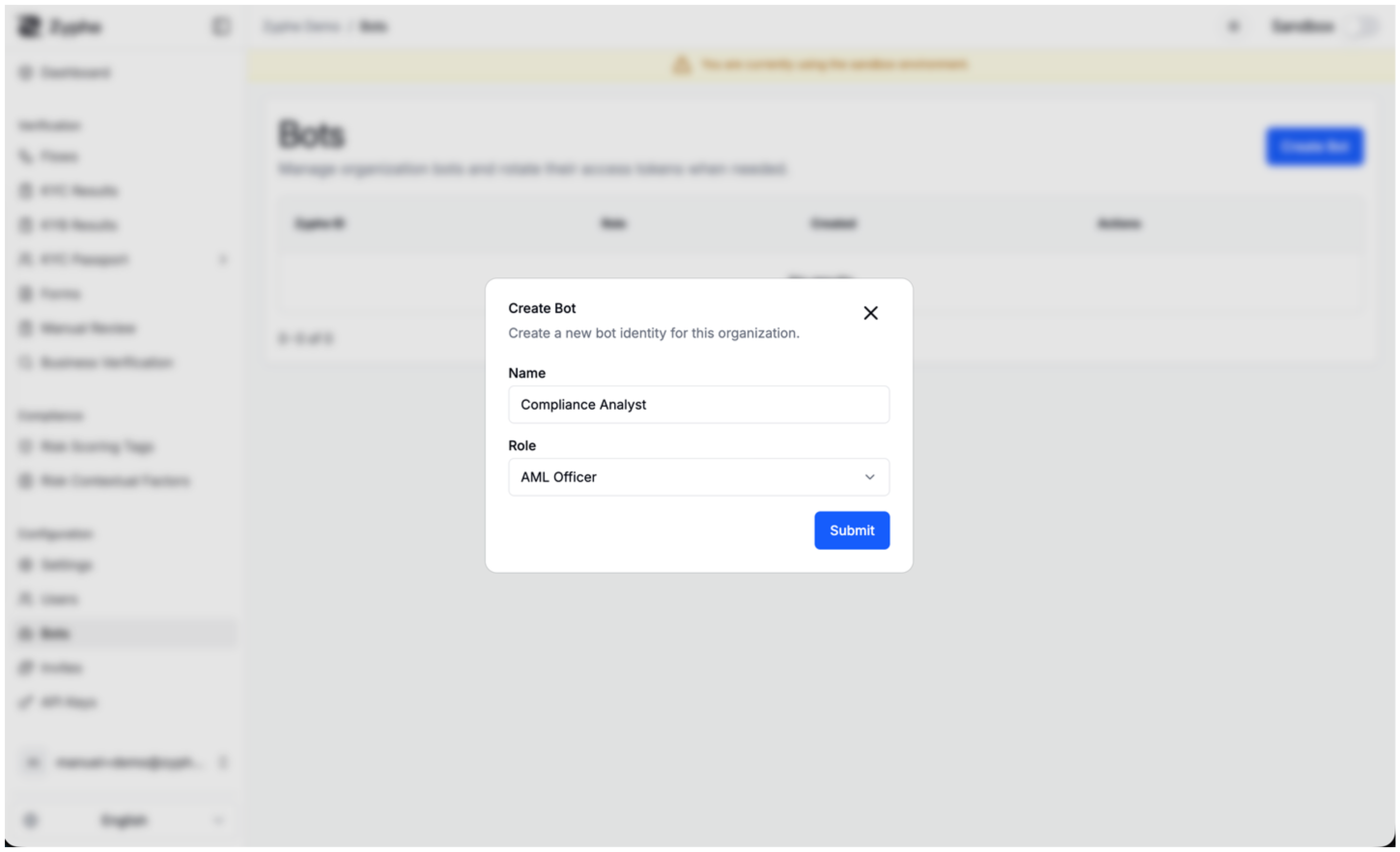
The MCP server is authenticated with bot tokens. Bots are organization-scoped service identities; their permissions are evaluated by the same role-based access control policies that govern the REST API, so a bot can only do what its assigned role is allowed to do.
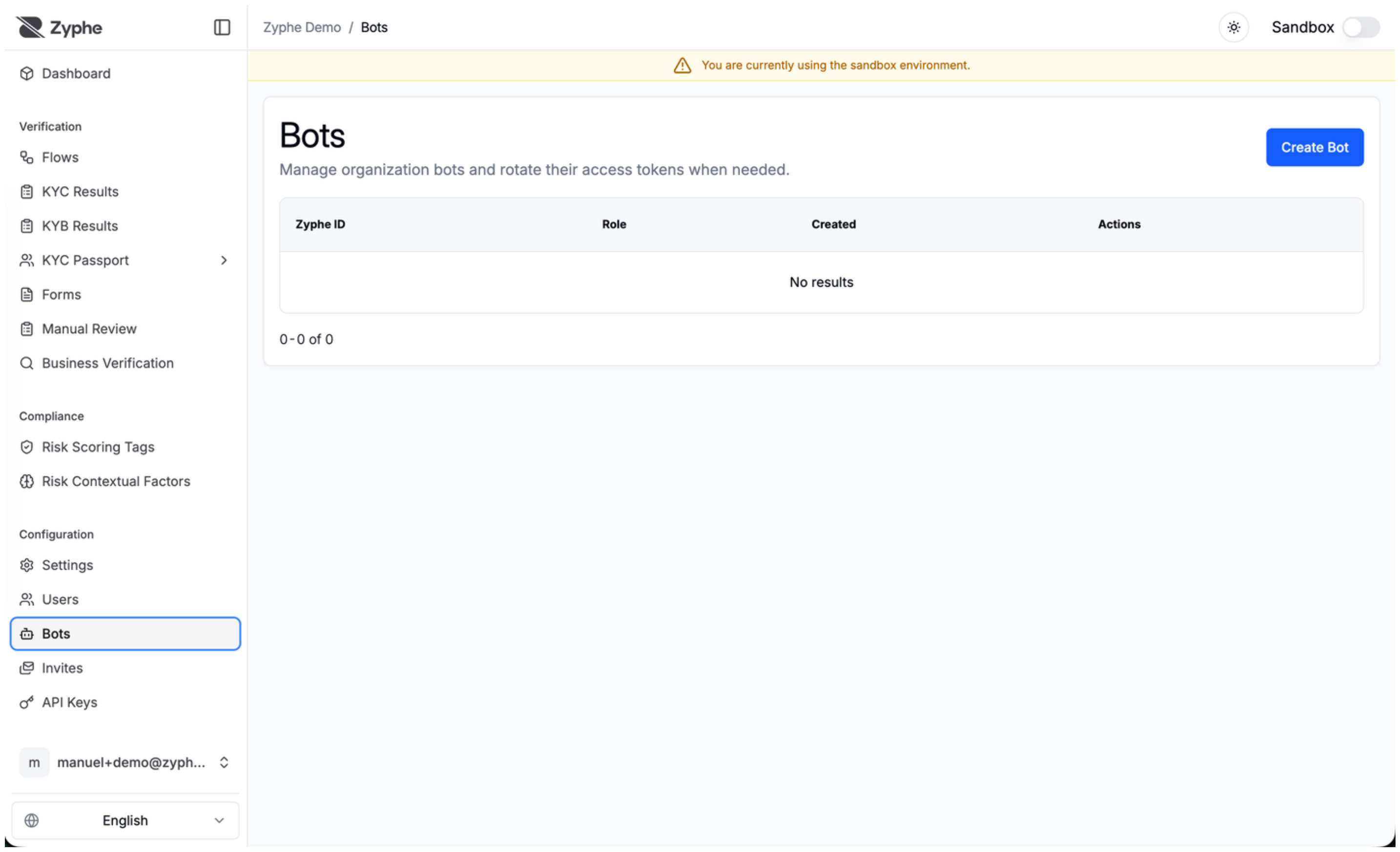
1. Create a bot and obtain a token
Bot management lives under /organizations/{organization_id}/bots/... in the REST API:
| Method | Path | Purpose |
|---|---|---|
GET | /organizations/{org_id}/bots/list | List bots in the organization |
POST | /organizations/{org_id}/bots/create | Create a new bot (returns plain token) |
GET | /organizations/{org_id}/bots/{bot_id}/get | Fetch bot metadata |
POST | /organizations/{org_id}/bots/{bot_id}/regenerate-token | Issue a new token; the previous one dies |
DELETE | /organizations/{org_id}/bots/{bot_id}/delete | Soft-delete the bot |
The plain-text token is returned only once at creation (or regeneration). It looks like:
zyphe_bot_<48 random alphanumeric characters>
Tokens are SHA-256 hashed on the server, so Zyphe cannot retrieve a lost token. If you misplace one, regenerate it. Treat bot tokens like passwords: never commit them to source control, never paste them into chat logs.
2. Use the token
Send it as a Bearer token on the Authorization header:
Authorization: Bearer zyphe_bot_xxxxxxxxxxxxxxxxxxxxxxxxxxxxxxxxxxxxxxxxxxxxxxxx
Authentication failures are answered with 401 Unauthorized and a JSON body that distinguishes
the two cases:
| Situation | Body |
|---|---|
No Authorization header at all | {"error":"Missing Authorization header"} |
A header that is not a well-formed Bearer credential | {"error":"Invalid bot token"} |
A well-formed Bearer credential whose token is unknown | {"error":"Invalid bot token"} |
A malformed header used to be reported as a missing one, which sent client authors looking for a header they were in fact sending. It is now answered as the bad credential it is.
If the bot's role does not allow the requested operation, the tool call returns an MCP error with
code INVALID_REQUEST and message "Permission denied".
MCP clients routinely request /mcp without credentials while probing the endpoint before
completing authentication. Those rejected probes no longer write anything to your audit trail, and
neither does protocol chatter such as initialize, tools/list, or ping. Real tool
invocations are still audited, as readable per-call events — see Auditing.
Endpoint
The MCP server is mounted on the same host and port as the Zyphe API:
POST {ZYPHE_API_BASE_URL}/mcp
It uses the Streamable HTTP transport from the MCP specification. Any MCP-compliant client that supports HTTP transport can connect to it.
Connecting a client
Claude Desktop / Claude Code
Add an entry to your mcp.json (or the equivalent config UI):
{
  "mcpServers": {
    "zyphe": {
      "transport": {
        "type": "http",
        "url": "https://api.zyphe.com/mcp",
        "headers": {
          "Authorization": "Bearer zyphe_bot_YOUR_TOKEN_HERE"
        }
      }
    }
  }
}
Replace https://api.zyphe.com with the URL of your Zyphe deployment, and substitute your bot token.
Cursor
Cursor supports MCP via the same JSON config format. Add the snippet above to your Cursor MCP settings.
Generic / programmatic
Any MCP client SDK (TypeScript, Python, etc.) that supports the streamable-HTTP transport can talk to /mcp. Point the transport at the URL and inject the Authorization header.
Tool reference
All parameters use camelCase keys. Every tool also accepts an optional sandbox boolean (default false) to target the sandbox environment instead of production.
KYB
Tools that work an existing KYB result. All of them take kybResultId, the UUID of the KYB result.
get_kyb_result
Read-only. Get a KYB result by its ID, scoped to the bot's organization.
| Field | Type | Required | Description |
|---|---|---|---|
kybResultId | string | yes | UUID of the KYB result |
sandbox | boolean | no | Read from the sandbox environment |
get_pending_kyb_clarifications
Read-only. List pending clarification requests for a KYB result. Required: kybResultId.
send_kyb_clarification_request
Write. Request business-information clarification from the client. Moves the KYB next action to Client.
| Field | Type | Required | Description |
|---|---|---|---|
kybResultId | string | yes | UUID of the KYB result |
documentName | string | yes | Clarification request title shown to the client |
fields | string[] | yes | Business information field keys to clarify |
description | string | no | Clarification instructions for the client |
review_kyb_clarification_field
Write. Approve one submitted clarification field, but only when the cross-check classified it as an exact, auto-correct, or fuzzy match against the document-collected value. Does not approve the KYB.
Required: kybResultId, documentRequestId, fieldKey.
approve_kyb_result
Write. Guarded final KYB approval. Approves only when no clarifications remain open and every document-backed business-information verification field is an exact, auto-correct, or fuzzy match.
| Field | Type | Required | Description |
|---|---|---|---|
kybResultId | string | yes | UUID of the KYB result |
reason | string | no | Audit reason for the agent approval |
mark_kyb_for_admin_review
Write. Safely escalate a KYB result to human review. Does not approve the KYB. Required: kybResultId, reason.
send_ubo_kyc_reminder
Write. Send the KYC invitation or reminder email to a single UBO, identified by its zero-based index in uboDefinitions. For an un-onboarded UBO this sends the initial invitation.
Required: kybResultId, recipientIndex (integer, minimum 0).
edit_kyb_business_information
Write. Directly correct one or more business-information field values as a reviewer edit. Each edited field is marked as a verification match and any pending clarification on it is auto-resolved. Allowed only while the KYB result is under review.
| Field | Type | Required | Description |
|---|---|---|---|
kybResultId | string | yes | UUID of the KYB result |
updates | object[] | yes | Each { fieldKey, value }. Keys include companyName, registrationNumber, country, address, city, postZipCode, businessActivity, incorporationDate, companyType, contactEmail |
reason | string | yes | Reason for the correction, recorded in the activity log |
add_kyb_ubos
Write. Add one or more UBOs to an existing KYB result. A UBO with an email is sent a KYC invitation and must complete full KYC; a UBO without an email is screened by name only (AML) and is not notified. Allowed only while the KYB is under review.
| Field | Type | Required | Description |
|---|---|---|---|
kybResultId | string | yes | UUID of the KYB result |
persons | object[] | yes | Each requires firstName, lastName, dateOfBirth, country, gender; email optional |
remove_kyb_ubo
Write. Remove a UBO by its stable personId. Any name-only AML screening for that UBO is removed too. Allowed only while the KYB is under review.
add_kyb_directors
Write. Add one or more directors. Same email and name-only semantics as add_kyb_ubos. Allowed only while the KYB is under review.
remove_kyb_director
Write. Remove a director by its stable personId. Any name-only AML screening for that director is removed too.
request_kyb_document
Write. Request a specific on-demand per-country document by its catalog key, validated against the KYB's country, and notify the client. Creates a Standard document request for the client to upload.
| Field | Type | Required | Description |
|---|---|---|---|
kybResultId | string | yes | UUID of the KYB result |
documentKey | string | yes | Catalog key of the on-demand document |
description | string | no | Instructions shown to the client |
recipientEmail | string | no | Recipient override; defaults to the business contact email |
subject | string | no | Notification email subject |
body | string | no | Notification email body |
set_kyb_screening_strategy
Write. Change which population of natural persons this KYB must identify and screen before it can be approved. Does not approve the KYB.
| Field | Type | Required | Description |
|---|---|---|---|
kybResultId | string | yes | UUID of the KYB result |
strategy | string | yes | ubo (the default), directors, or uboAndDirectors |
reason | string | yes | Why the default test is the wrong one for this business |
Use it when beneficial ownership is the wrong test — a listed company with no natural person above the ownership threshold, where directors are the screenable population.
It is guarded: it accepts only a strategy the people already on file satisfy. Every strategy requires at least one screened person, so no sequence of calls can make an unidentified business approvable by an agent or by automatic completion. A human reviewer keeps their override either way. It emits its own KYB_SCREENING_STRATEGY_CHANGED audit entry carrying the previous and new strategy, the reason, and the UBO and director counts at that moment.
See Which population must be screened.
AML
get_aml_result
Read-only. Get an AML screening result by its ID: the scored entity hits, submitted identity, adverse media, moderation state, and flags.
Required: amlResultId.
clear_aml_result
Write. Guarded false-positive clear, moderating the screening to Approved. A deterministic server-side guard refuses to clear a high-confidence sanctions match, a Critical overall risk, a result already under a human verdict, or a screening lacking identity discriminators.
| Field | Type | Required | Description |
|---|---|---|---|
amlResultId | string | yes | UUID of the AML result |
reason | string | no | Audit reason for the clear |
escalate_aml_result
Write. Escalate a screening to a human reviewer, moderating it to Escalated. Use it for genuine or ambiguous hits, and state in the reason if enhanced due diligence is recommended.
Required: amlResultId, reason.
Reading cases and evidence
Two read-only tools let an agent understand a case before acting on it, and evidence what it did afterwards.
get_kyc_result
Read-only. Get a KYC verification case (a flow result) as a decision summary: per-step statuses and failure reasons, document-verification scores, the manual-review outcome, AML screening flags, the risk score, assigned risk tags, and the review suggestion.
| Field | Type | Required | Description |
|---|---|---|---|
flowResultId | string | yes | UUID of the flow result (the case) |
sandbox | boolean | no | Read from the sandbox environment |
The case's personal data is withheld by design, and for most of it there is no way to ask again: identity-document contents, submitted form answers, the IP address, and the wallet address are returned by no tool on this surface at all. Screened names are the one exception — read them with get_aml_result or get_kyb_result.
get_audit_trail
Read-only. Read the organization's tamper-evident audit log, newest first. Every field is optional.
| Field | Type | Description |
|---|---|---|
resourceType | string | PascalCase resource type, e.g. FlowResult, KybResult, AmlResult, Flow, ApiKey. An unrecognised value is rejected rather than silently matching nothing. |
resourceId | string | UUID of the resource whose history you want |
action | string | SCREAMING_SNAKE_CASE action, e.g. VIEWED, KYB_APPROVED, AML_RESULT_MODERATED. Rejected the same way an unrecognised resourceType is. |
actorZid | string | Restrict to one actor (a user email or a bot zid) |
createdAtFrom | string | Only entries at or after this RFC 3339 timestamp |
createdAtTo | string | Only entries at or before this RFC 3339 timestamp |
skip | integer | Entries to skip (default 0) |
take | integer | Entries to return (default 25, maximum 100) |
Each entry carries its id, its position and hash in the chain, and the action's outcome. An agent sees its own earlier tool calls here, with their arguments, so a disposition can be evidenced rather than asserted.
The payload of an action taken outside the MCP surface is withheld — its top-level keys are named instead — because it can carry the case's personal data. Actor IP addresses and session ids are never returned, and end-user actor identifiers are masked.
The Agent Mode on a flow step configures which tools Zyphe's own autonomous reviewer is handed for that flow. It is not an authorization control and no tool checks it. A bot with an admin role calling approve_kyb_result does exactly what an admin person calling the REST approve endpoint does, on a flow at any agent mode. Scope your bots' roles accordingly.
Flows
list_flows
List flows for the bot's organization, with optional pagination, sorting, and filtering.
| Field | Type | Required | Description |
|---|---|---|---|
skip | integer | no | Records to skip (default 0) |
take | integer | no | Records to return (default 100) |
sort | string | no | Sort field and direction, e.g. "createdAt:desc" |
filter | string | no | Semicolon-separated triples "field:operator:value" (e.g. "flow_type:eq:KYC") |
sandbox | boolean | no | Use sandbox environment |
create_flow
Create a new flow. Required: name, slug, successUrl.
| Field | Type | Description |
|---|---|---|
name | string | Display name of the flow |
slug | string | URL-safe identifier (e.g. "kyc-flow") |
successUrl | string | Redirect URL on successful completion |
failureUrl | string | Redirect URL on failure (optional) |
sandbox | boolean | Create in sandbox environment |
webhookUrl is vestigial hereThe published tool schema still advertises a webhookUrl parameter and lists it as required, but
a flow no longer has one: the value is accepted and ignored. Configure destinations as
organization webhook endpoints instead. If your MCP client validates
against the advertised schema, pass any placeholder string — it has no effect.
update_flow
Update an existing flow's metadata. Required: flowId, name, slug, successUrl. The same
webhookUrl caveat applies.
get_flow
Get a flow by its ID. Required: flowId.
delete_flow
Soft-delete a flow by its ID. Required: flowId.
get_flow_settings
Get the settings (branding, webhook options, notifications) for a flow. Required: flowId.
update_flow_settings
Update the settings for a flow. Required: flowId. All other fields are optional and patch-style; only provided fields are changed.
| Field | Type | Description |
|---|---|---|
webhookSecret | string | Legacy HMAC secret. See the note below. |
extendedWebhook | boolean | Include extended data in webhook payloads |
published | boolean | Whether the flow is publicly accessible |
Signing secrets and the extended-payload switch are properties of an
organization webhook endpoint. webhookSecret here writes the legacy
organization settings field, which the endpoint registry no longer signs with — rotate the
organization secret through the webhooks API instead.
Flow steps
create_flow_step
Add a new step to a flow. Required: flowId, name, stepType, config, order.
| Field | Type | Description |
|---|---|---|
flowId | string | UUID of the parent flow |
name | string | Display name of the step |
stepType | string | One of: DV, FORM, POA, KYB, KYB_DOCUMENTS, KYB_UBOS, KYB_DIRECTORS, SPID, PHONE, WALLET, LIVENESS, AUTO_ONE_CLICK_KYC, DOCUMENT_SELECTION, GEOLOCATION |
config | object | Step configuration object (must contain a matching stepType discriminator) |
order | integer | Position of the step in the flow (0-based) |
successUrl | string | Override success redirect URL for this step (optional) |
failureUrl | string | Override failure redirect URL for this step (optional) |
Each step type has its own config schema. See the flow-step guides for the shape of each step's configuration, and KYB steps and configuration for the four KYB step types.
The tool's own description string still lists the pre-split step types. The three KYB satellite types are accepted — the description lags the enum.
update_flow_step
Update a step's name, config, or redirect URLs. Required: flowId, stepId, config.
delete_flow_step
Soft-delete a step from a flow. Required: flowId, stepId.
Forms
list_forms
List forms for the bot's organization, with optional pagination and sorting. Same pagination fields as list_flows (without filter).
create_form
Create a new form. Required: name, sections.
| Field | Type | Description |
|---|---|---|
name | string | Display name of the form |
sections | array | Array of FormSection objects |
update_form
Update a form's name and/or sections. Required: formId.
get_form
Get a form by its ID. Required: formId.
delete_form
Hard-delete a form by its ID. Required: formId.
API keys
list_api_keys
List API keys for the bot's organization.
create_api_key
Create a new API key. Required: keyType. The plain-text key is returned once in the key field of the response, so store it immediately.
| Field | Type | Description |
|---|---|---|
keyType | string | SECRET or PUBLISHABLE |
name | string | Human-readable name (optional) |
description | string | Description (optional) |
allowedOrigins | array of strings | Allowed CORS origins (optional) |
options | object | Additional options as a JSON object |
get_api_key
Get an API key by its ID. Required: apiKeyId.
update_api_key
Update an API key's name, description, allowed origins, or options. Required: apiKeyId.
delete_api_key
Soft-delete an API key by its ID. Required: apiKeyId.
Sandbox vs production
Every tool takes an optional sandbox boolean. When true, the tool reads and writes against the sandbox dataset; when false or omitted, it operates on production data.
This means a single bot token can drive both environments, which is useful for agents that build a flow in sandbox, validate it, and then promote it to production in one session.
Error handling
MCP errors follow the standard MCP error model:
| Condition | Error code | Notes |
|---|---|---|
| Missing or malformed parameters | INVALID_PARAMS | Returned when JSON parsing or schema check fails |
| Unknown tool name | METHOD_NOT_FOUND | Tool not registered on this server |
| RBAC policy denial | INVALID_REQUEST | Message: "Permission denied" |
| Unexpected backend / DB / RBAC error | INTERNAL_ERROR | Server-side failure; check Zyphe logs |
HTTP-level failures (401, 403) are returned before the MCP envelope and indicate problems with the bot token or middleware, not with a specific tool call.
Auditing
Every tool invocation writes a readable event to your organization's audit trail, naming the
tool, its arguments, and its outcome. That is what makes an agent's work reviewable and lets
get_audit_trail evidence a disposition rather than assert it.
Two things are deliberately not audited, because they are noise rather than activity:
- MCP protocol chatter —
initialize,tools/list,ping. - Unauthenticated requests to
/mcp. MCP clients probe the endpoint before completing authentication, and every such probe used to leave an actor-less failure row in the trail.
Some tools write their own domain events on top of the per-call event — approve_kyb_result
writes a KYB approval, set_kyb_screening_strategy writes
KYB_SCREENING_STRATEGY_CHANGED — so a reviewer sees the decision, not just the call.
Example session
A typical agent conversation with the Zyphe MCP server might look like this (paraphrased; the agent translates intent into tool calls):
You: Create a sandbox flow called "Onboarding Test" with a document verification step.
Agent:
- calls
create_flowwith{ name: "Onboarding Test", slug: "onboarding-test", successUrl: "...", sandbox: true }- takes the returned
flowIdand callscreate_flow_stepwith{ flowId, name: "DV", stepType: "DV", config: { stepType: "DV", ... }, order: 0, sandbox: true }- returns: "Created sandbox flow
onboarding-test(id…) with one DV step at position 0."
A case-work session looks different, because the agent is disposing of real compliance work rather than configuring it:
You: Take a look at AML result
…and clear it if it is obviously a false positive.Agent:
- calls
get_aml_resultwith{ amlResultId: "…" }and reads the scored hits, submitted identity, and adverse media- decides the hit is a common-name collision with no matching date of birth or nationality
- calls
clear_aml_resultwith{ amlResultId: "…", reason: "Name-only collision; DOB and nationality both mismatch the listed entity." }- returns: "Cleared. Had the guard refused — high-confidence sanctions match, Critical risk, existing human verdict, or no identity discriminators — I would have escalated instead."
The agent's judgement is not what makes this safe. The server-side guard is: if the screening had been a high-confidence sanctions match, clear_aml_result would have refused the call regardless of what the model concluded, and the correct next step would have been escalate_aml_result.
Security notes
- The KYB and AML write tools carry deterministic server-side guards.
approve_kyb_resultandclear_aml_resultrefuse unsafe calls on the server, so the guarantee does not depend on the calling model's reasoning or on prompt wording. - Bot tokens authenticate at the request level; the MCP transport does not add a separate session layer.
- All tool calls are subject to the same role-based access control policies that govern the REST API. A bot scoped to a specific role cannot escalate privileges through MCP.
- Token hashes are stored with SHA-256; plain-text tokens are never persisted.
- Regenerating a bot's token instantly invalidates the previous one. Use this if you suspect leakage.
- A bot has the authority of its role. A flow step's Agent Mode configures Zyphe's own autonomous reviewer; it is not an authorization boundary and no tool checks it. Give a bot the narrowest role that lets it do its job.
- Personal data is withheld by design. Identity-document contents, submitted form answers, IP addresses, and wallet addresses are returned by no tool on this surface. Screened names come back only from
get_aml_resultandget_kyb_result, and the audit trail masks end-user actor identifiers and never returns actor IPs or session ids. - Every tool call is recorded in the audit trail. See Auditing.