Sandbox mode
Sandbox lets you create flows, run verifications, and receive webhooks against synthetic / non-production data. Production uses the same API and verification hosts; the difference is the sandbox flag on each request and the /sandbox path on the hosted UI.
For the go-live checklist, see Sandbox and go-live. For hosts, see Environment setup.
What “sandbox” means
| Layer | How sandbox is expressed |
|---|---|
| Dashboard | Toggle the organization / UI into sandbox when building flows and reviewing sandbox results |
| API query parameter | ?sandbox=true or ?sandbox=false on SDK HTTP endpoints (required on create, next-step, step completion, list results, …) |
| npm SDK | isSandbox: true | false on session helpers (mapped to the sandbox query param) |
| Hosted session URL | Sandbox: https://verify.zyphe.com/sandbox/flow/<flowSlug>?… · Production: https://verify.zyphe.com/flow/<flowSlug>?… |
| API host | Unchanged: still https://api.zyphe.com |
Sandbox is not a separate base URL on production accounts. Setting ZYPHE_BASE_URL=https://docs.zyphe.com or inventing a sandbox.api… host will not work.
Credits and billing in sandbox
Sandbox is a separate data plane, not a separate wallet. Verifications you run in sandbox are priced with the same credit cost as production and are deducted from the same organization credit balance. Usage counters are kept per environment (the Usage This Period table on the Billing page follows the dashboard's sandbox toggle), but there is only one balance behind both.
Internal test traffic is free
A sandbox verification is recorded at zero credits when the person being verified is recognised as internal to your organization. That is the case when either:
- the identity's identifier matches a member of your organization (the
zypheEmailyou pass for email-based identities, or the wallet address / DID for other identity types), or - the identifier is an email address whose domain matches the domain of any member of your
organization, for example any
@yourcompany.comaddress while a colleague signs in withalice@yourcompany.com.
Zyphe can whitelist additional domains for your organization on request, for example a dedicated QA domain that nobody signs in with.
The run still appears in the usage table, with a credit cost of 0.
Practical consequence: run sandbox QA with email addresses on your own domain and it costs nothing. Sandbox runs against arbitrary external addresses (a customer's address, a throwaway mailbox, a load-test generator) are billed exactly like production.
Exceptions
| Situation | Sandbox behavior |
|---|---|
| During the trial | Every sandbox event consumes trial credits, including internal ones. Trial credits exist to be spent testing |
| Requester has no resolvable identifier | Treated as external, billed normally |
| Operations not tied to a verified person | Billed normally (they carry no identifier to match against your organization) |
If auto-recharge is enabled
Because sandbox draws on the real credit balance, sandbox consumption can push the balance under the automatic top-up threshold and trigger a real card charge. Keep this in mind before pointing a load test or a test-data generator at sandbox.
Rules that must match
Treat these as one unit for a given verification:
- The flow and data you intend to use live in sandbox or production in the dashboard.
- Every API call for that verification uses the same
sandboxvalue (truewith sandbox,falsewith production). - The session URL you open in the browser / WebView uses the matching path (
/sandbox/flow/…vs/flow/…). - Webhooks for that run go to the endpoint configured on that flow; process sandbox and production separately if both are active.
| Create / complete API | Hosted UI path | Intended mode |
|---|---|---|
sandbox=true | /sandbox/flow/<slug>?… | Sandbox |
sandbox=false | /flow/<slug>?… | Production |
Mismatch behavior
If the sandbox query parameter does not match the environment the flow and verification request were created in, the API returns an error (typically a client error with a structured errorTag such as flow_not_found, verification_request_not_found, or a validation / permission failure). Do not expect a silent success.
Common mistakes:
- Creating the session with
sandbox=true, then openinghttps://verify.zyphe.com/flow/…(missing/sandbox) - Copy-pasting a production curl with
sandbox=falsewhile the dashboard is in sandbox - Reusing a production secret key / flow ID against the wrong mode without aligning
sandbox
Always set the flag explicitly on every call. Do not rely on defaults from outdated snippets.
Session URL examples
Sandbox
https://verify.zyphe.com/sandbox/flow/<flowSlug>?zypheVr=<verificationRequest.id>&zypheToken=<zypheToken>&zypheAccessSig=<zypheAccessSig>&zypheEmail=<email>
Production
https://verify.zyphe.com/flow/<flowSlug>?zypheVr=<verificationRequest.id>&zypheToken=<zypheToken>&zypheAccessSig=<zypheAccessSig>&zypheEmail=<email>
How to obtain the tokens: Backend API integration.
Dashboard vs API
- Building and testing in the dashboard sandbox mode only affects dashboard-created runs and the sandbox data plane.
- Programmatic integrations must still send
sandbox=trueon API calls for sandbox sessions. - Switching the dashboard to production does not automatically convert your backend; update keys,
sandbox=false, and session URL composition together.
Deleting sandbox results
When you test a flow in sandbox, you usually want to run it again with the same test person. The dashboard lets you delete a sandbox flow result so you can do that.
Open KYC Results (or KYB Results) with the dashboard in sandbox. Then either choose Delete from the row's action menu, or open the result and click the delete button in its toolbar.


Either way, a dialog asks you to confirm. Click Delete result to delete only the result.
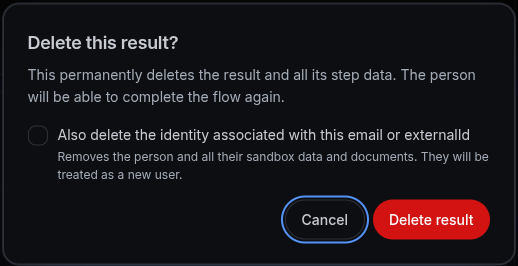
Deleting a result removes:
- the result and the data from every step (KYB step results included)
- its verification-request history, score outcomes and score history
- its KYB document requests and communications
- the test person's verification requests for that flow
The person can then complete the flow again from the first step. Earlier step statuses, such as a rejected or in-review step, do not carry over, and neither do document-verification attempt counts.
Deleting a result also removes its stored document files. Deleting a result can't be undone.
Also deleting the identity
Deleting the result does not delete the person. Zyphe still recognizes them by their email or
externalId, and because their vault still holds the documents from the earlier run, the next run
offers them one-click KYC instead of a fresh
verification.
To test the first-time experience again, tick Also delete the identity associated with this email
or externalId in the delete dialog, type DELETE to confirm, and click Delete result and
person. This also deletes the identity, its sandbox verification data, its documents and its
vault. On the next run the person is treated as a new user.
Zyphe refuses to delete the identity, and deletes nothing at all, if the person:
| Situation | What to do |
|---|---|
| Has other flow results in your organization | Delete those results first, then this one |
| Also has production data (results, verifications, KYC documents) | Delete the result alone |
| Has results in another organization | Delete the result alone |
| Is not a verification subject (for example, a dashboard user) | Delete the result alone |
In each case the dialog stays open with the reason and clears the checkbox, so you can confirm again to delete only the result.
Who can delete
Organization Admin, Operator and Developer users can delete sandbox results. See Manage users.
Deleting results is available in sandbox only, for now. In production the dashboard doesn't offer the action. Once production deletion is enabled, it will remove only the result: the identity option will stay sandbox-only.