Settings and Alerts
Transaction Monitoring → Settings holds the organization-wide values every rule uses: how the combined P(risk) turns into a decision, which timezone interprets time-of-day fields, and where alerts are delivered.
These are not per-rule. Each rule’s condition can read hour of day or compare P(risk) bands; the clock and the Allow / Review / Block cutoffs themselves live here. Change them once, and every enabled rule sees the new values on the next ingest.
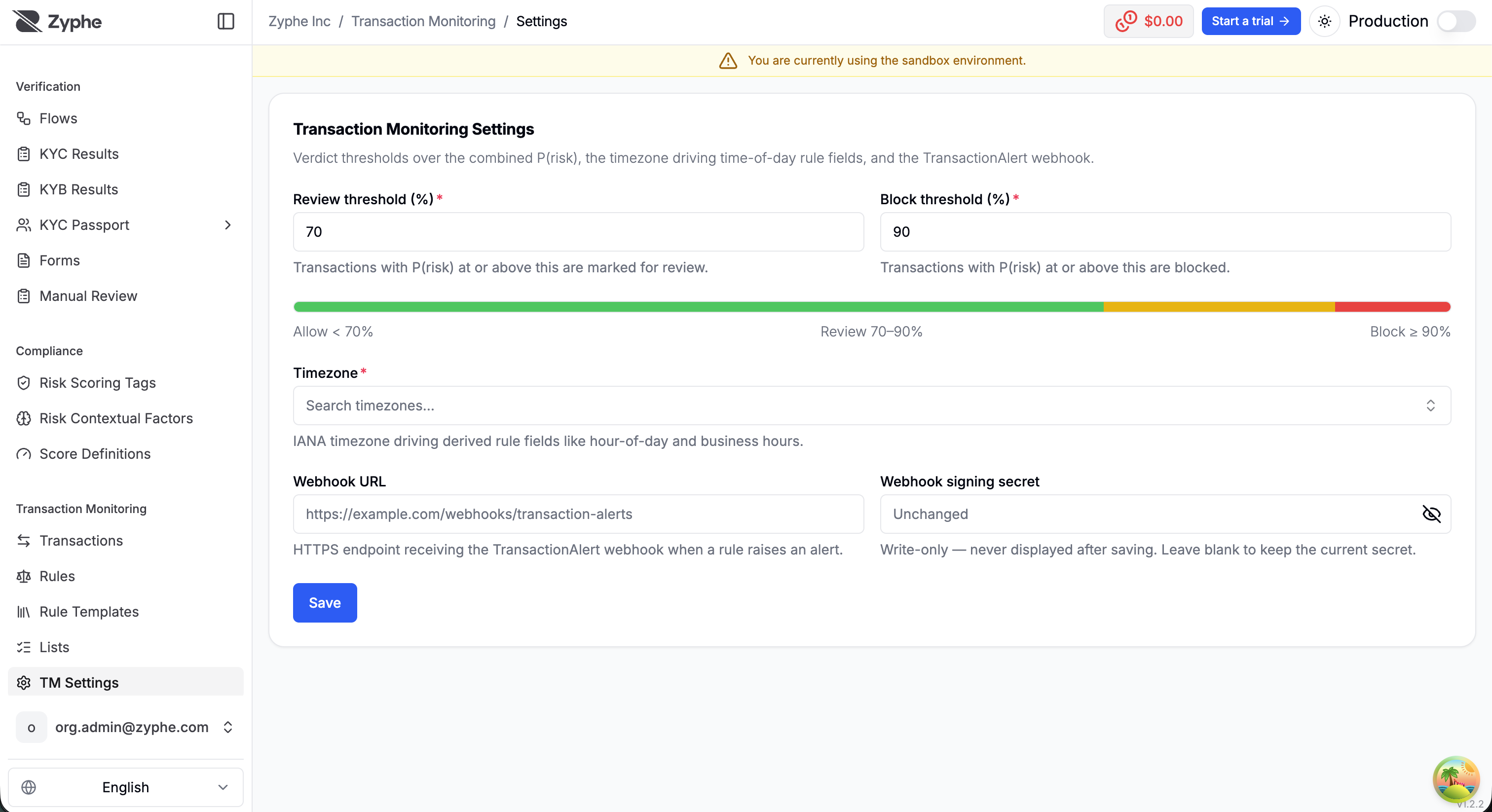
Decision thresholds
Two percentage thresholds over the combined P(risk) split the decision space:
| Range | Decision |
|---|---|
P(risk) below the review threshold | Allow |
P(risk) ≥ review threshold | Review |
P(risk) ≥ block threshold | Block |
Tightening or loosening the thresholds takes effect on the next ingested transaction; already-decided transactions keep their original verdict.
Set the thresholds to match the policy you agreed at onboarding (when a payment is held for review vs blocked). They apply to the combined P(risk) after all fired rules have been merged, not to a single rule’s probability.
Timezone
An IANA timezone (for example Europe/Rome) is the clock for local operativity. It drives the derived time fields in the rule builder: hour of day, day of week, and outside business hours.
Set it to the timezone your transaction book actually operates in, so a “night-time” or “weekend” rule fires in Italian (or UK) local time rather than in UTC. A payment at 01:00 in Rome is hour 1 when this is Europe/Rome, even if the ingest server is elsewhere.
Time-of-day conditions still live on the rule; this setting is how those conditions are interpreted.
Alerts
A rule saved with Raise alert does more than contribute probability when it fires:
- an alert is recorded against the transaction, visible in the transaction detail's fired-rules breakdown;
- the alert is delivered to your webhook, so you can route it into your own review or case-management workflow.
Alerts carry full provenance, the rule key, the exact rule version, and the probability it contributed, and every raised alert is also written to the immutable audit trail.
Alert webhook
Alerts are delivered to any organization webhook endpoint subscribed to transaction.alert.created. The payload identifies the transaction (including your external ID), the verified identity, the decision, the combined risk probability, and the raised alerts with their rule provenance.
transaction.alert.created is not flow-bound, so an endpoint's flow filter does not apply to it: an endpoint scoped to selected flows still receives TM alerts if it subscribes to them.
Deliveries are signed the same way as every other webhook — see Webhook signature.
The webhook URL and signing secret previously configured in Transaction Monitoring settings were converted into a dedicated endpoint named Transaction Monitoring (migrated), keeping the same URL and the same secret. Manage it under Webhooks from now on.